Overview
This document provides a comprehensive introduction to the llama.cpp repository, its architecture, and core capabilities. For detailed information about specific subsystems, refer to the dedicated sections: Core Library Architecture, Backend System, User Interfaces, and Model Management.
Purpose and Scope
llama.cpp 是一个专注于实现大语言模型(LLM)高效推理的项目。它提供了模型转换、量化和执行的工具,尤其侧重于在消费级硬件上运行模型。本概述涵盖了项目主 README 中描述的主要功能和工作流程。
llama.cpp is primarily an inference library that enables running large language models locally with state-of-the-art performance. The project serves as the main development playground for the ggml tensor operations library and provides both a C/C++ API and various user-facing tools.
主要功能
llama.cpp 生态系统提供以下几项关键能力:
- 模型转换:用于将模型从 Hugging Face Transformers 等格式转换为
llama.cpp使用的 GGUF(GGML 通用格式)的脚本。 - 量化:用于降低模型权重精度(例如,从16位浮点数降至4位整数)的工具,从而显著减小模型大小和内存需求,通常对性能影响极小。
- 推理:一个命令行界面(
llama-cli),用于运行量化或全精度 GGUF 模型以进行文本生成。 - 基准测试:诸如
llama-batched-bench之类的实用工具,用于测量和分析批量解码的性能。 - GGUF 格式:一种为快速加载和内存映射大语言模型而设计的自定义文件格式。
Key Characteristics
- Plain C/C++ implementation with no external dependencies for core functionality
- Hardware-agnostic design supporting CPU, GPU, and specialized accelerators
- Quantization support from 1.5-bit to 8-bit integer precision for memory efficiency
- GGUF file format for optimized model storage and loading
- OpenAI-compatible API through the HTTP server interface
High-Level Architecture
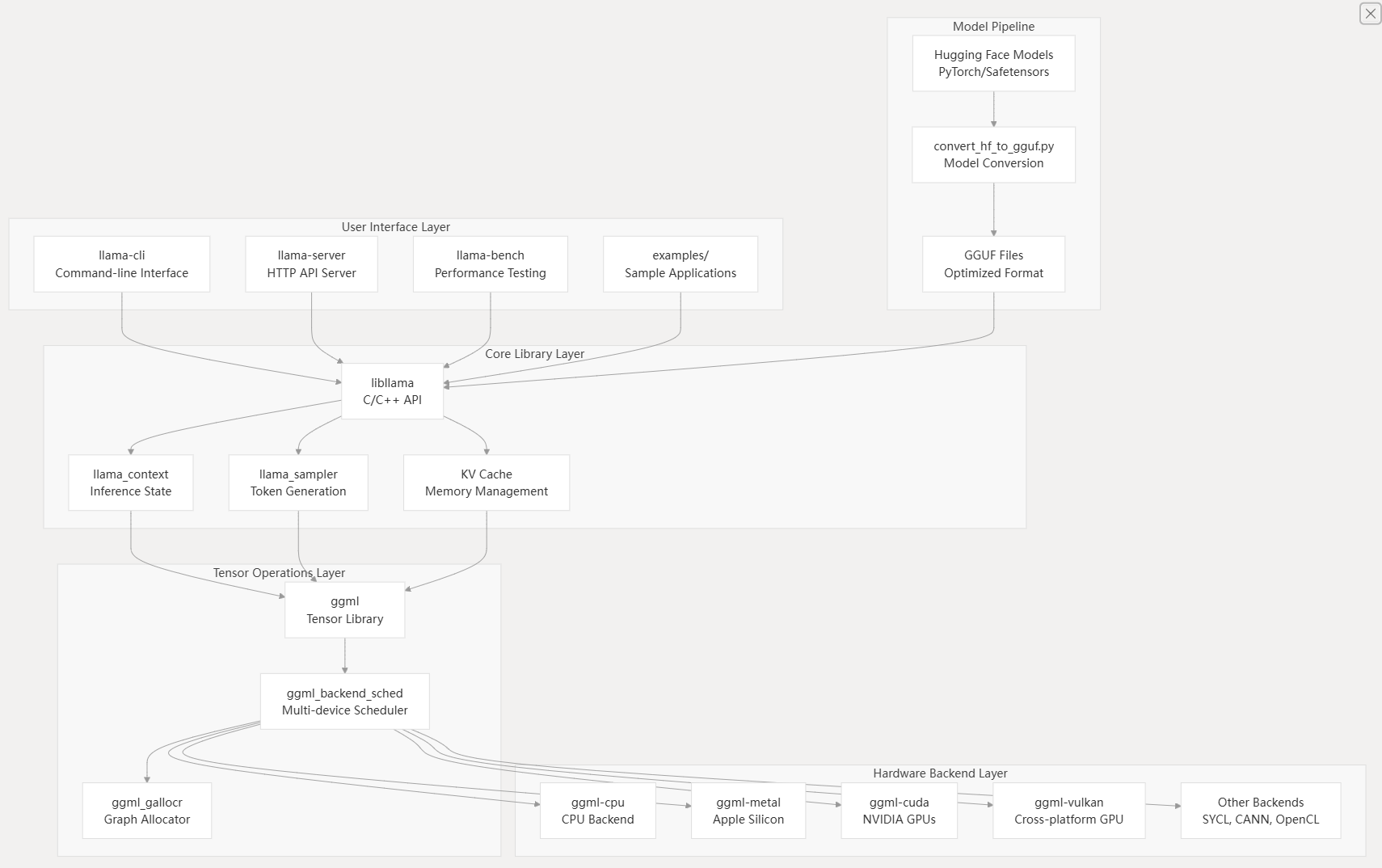
The llama.cpp system follows a layered architecture that separates concerns between user interfaces, inference logic, tensor operations, and hardware backends.
System Architecture Overview
Component Interaction Flow
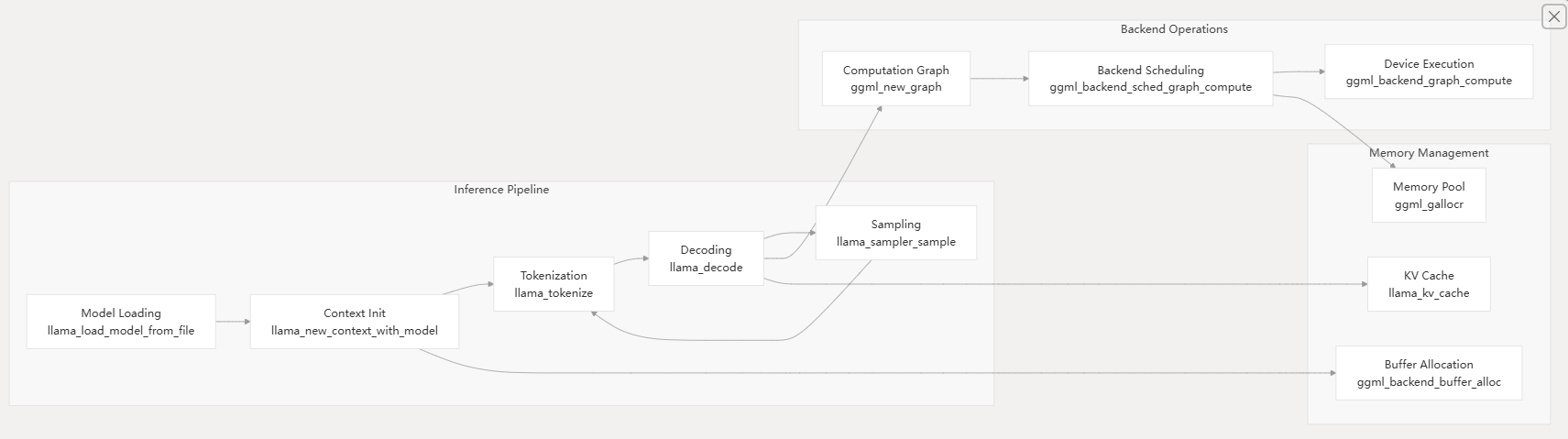
Core Components
libllama - Core Inference Library
The libllama library provides the primary C/C++ API for model loading, context management, and inference execution. Key data structures include:
llama_model- Represents a loaded model with weights and architecturellama_context- Maintains inference state including KV cache and sampling parametersllama_batch- Batches multiple sequences for efficient parallel processingllama_sampler- Configurable token sampling strategies
GGML Tensor Operations
The ggml library handles all tensor computations through a computation graph abstraction. It provides:
- Hardware-agnostic tensor operations
- Automatic differentiation capabilities
- Memory-efficient graph execution
- Backend abstraction for multi-device support
Hardware Backend System
The backend system enables llama.cpp to run efficiently across diverse hardware through a pluggable architecture:
| Backend | Target Hardware | Key Features |
|---|---|---|
ggml-cpu | All processors | SIMD optimization, threading |
ggml-metal | Apple Silicon | Metal Performance Shaders |
ggml-cuda | NVIDIA GPUs | Custom kernels, quantization |
ggml-vulkan | Cross-platform GPU | Compute shaders |
ggml-sycl | Intel/NVIDIA GPU | SYCL standard |
GGUF File Format
The GGUF (GPT-Generated Unified Format) provides optimized storage for LLM models with:
- Metadata for model architecture and hyperparameters
- Efficient tensor storage with optional quantization
- Memory-mapped loading for fast startup
- Extensible design for new model types
User Interface Tools
The repository includes several command-line tools built on the core library:
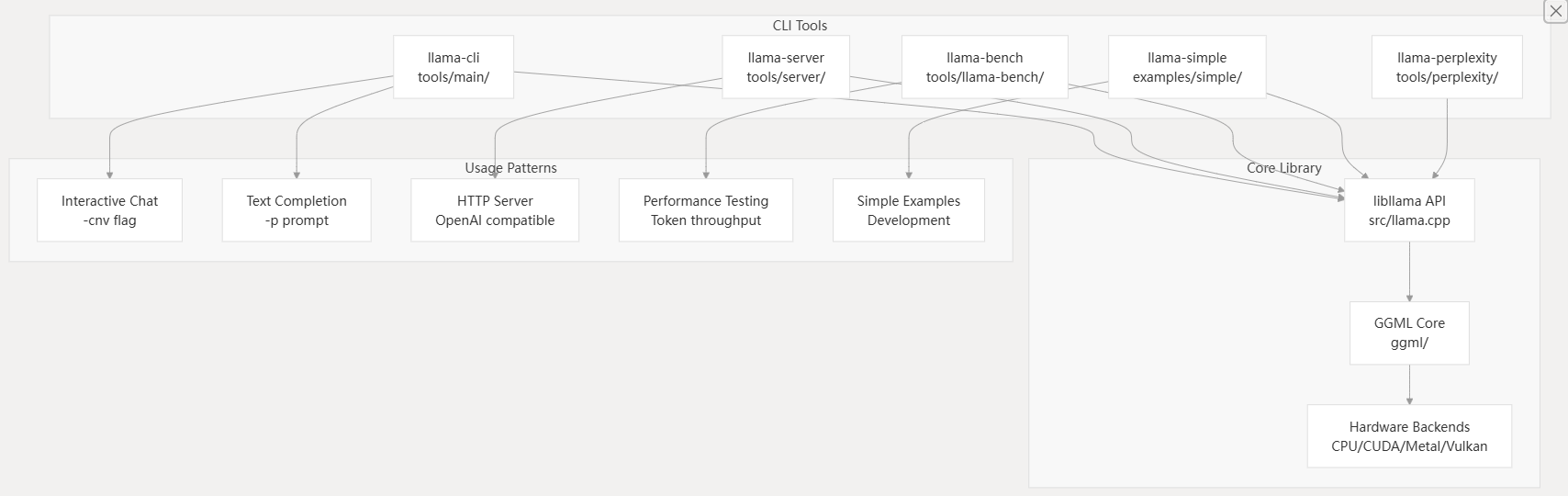
llama-cli- Interactive text generation and chat interfacellama-server- OpenAI-compatible HTTP API serverllama-bench- Performance benchmarking and testingllama-perplexity- Model quality evaluationconvert_hf_to_gguf.py- Model format conversion
Build System
The project uses CMake for cross-platform building with extensive configuration options for different backends and features. The build system supports:
- Static and shared library builds
- Optional backend compilation
- Cross-platform toolchain support
- Integration with package managers
The fastest way to get llama.cpp running with CPU support:
git clone https://github.com/ggml-org/llama.cpp
cd llama.cpp
cmake -B build
cmake --build build --config Release
This creates executables in build/bin/ including llama-cli, llama-server, and conversion tools.
For NVIDIA GPU acceleration, install the CUDA Toolkit and build with CUDA support:
# Install CUDA Toolkit (version 11.2+)
cmake -B build -DGGML_CUDA=ON
cmake --build build --config Release
GPU Architecture Configuration:
- Automatic detection:
CMAKE_CUDA_ARCHITECTURES="native" - Manual specification:
CMAKE_CUDA_ARCHITECTURES="75;80;86;89"
通过源码编译 纯新手教程:用llama.cpp本地部署DeepSeek蒸馏模型
llm.c 源码解析 - GPT-2 结构 | JinBridge
环境需求:
- Cmake
- cuda
- uv python env
Getting Started
Installation
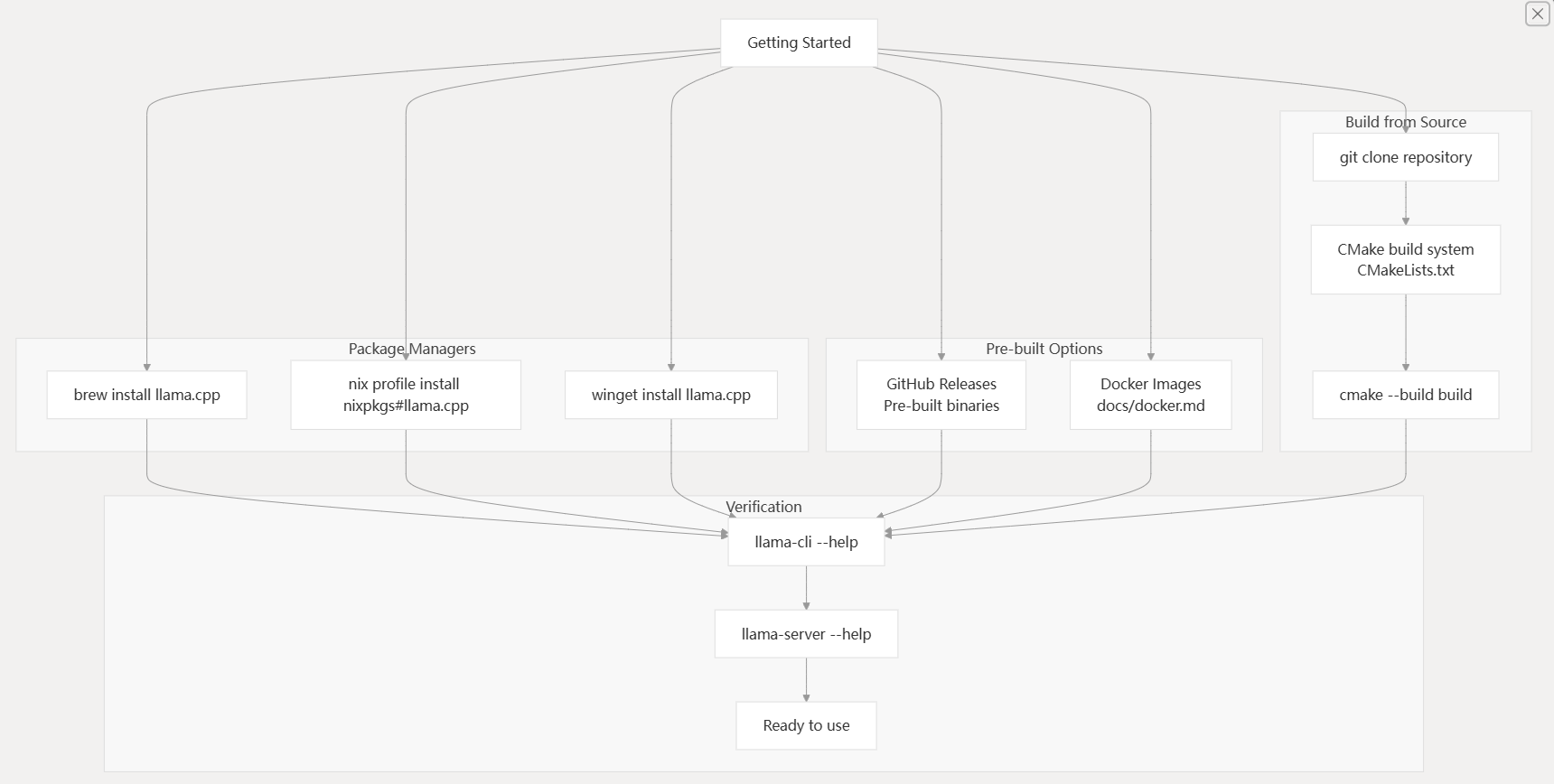
llama.cpp offers multiple installation methods to accommodate different user preferences and environments. The choice depends on your platform, development needs, and whether you want pre-built binaries or custom compilation.
Installation Methods Workflow
| Method | Command | Platform |
|---|---|---|
| Homebrew | brew install llama.cpp | macOS, Linux |
| Nix | nix profile install nixpkgs#llama.cpp | NixOS, Multi-platform |
| Winget | winget install llama.cpp | Windows |
| Docker | docker run --rm -it llamacpp/llama.cpp | All platforms |
For custom builds with specific backend support (CUDA, Metal, Vulkan), building from source is recommended. The CMakeLists.txt70-140 file provides numerous configuration options for different hardware accelerations.
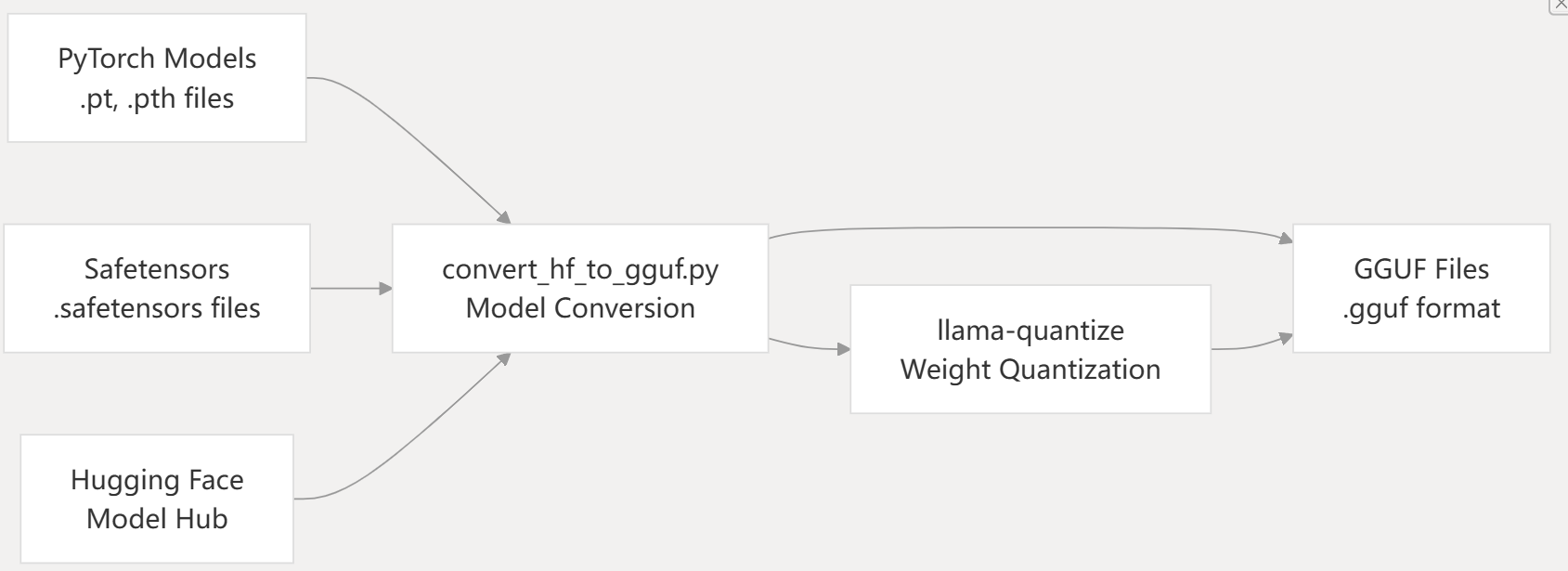
Model Acquisition Pipeline
llama.cpp requires models in GGUF format for inference. The model acquisition process involves either downloading pre-converted GGUF models or converting models from other formats.
Model Pipeline Architecture
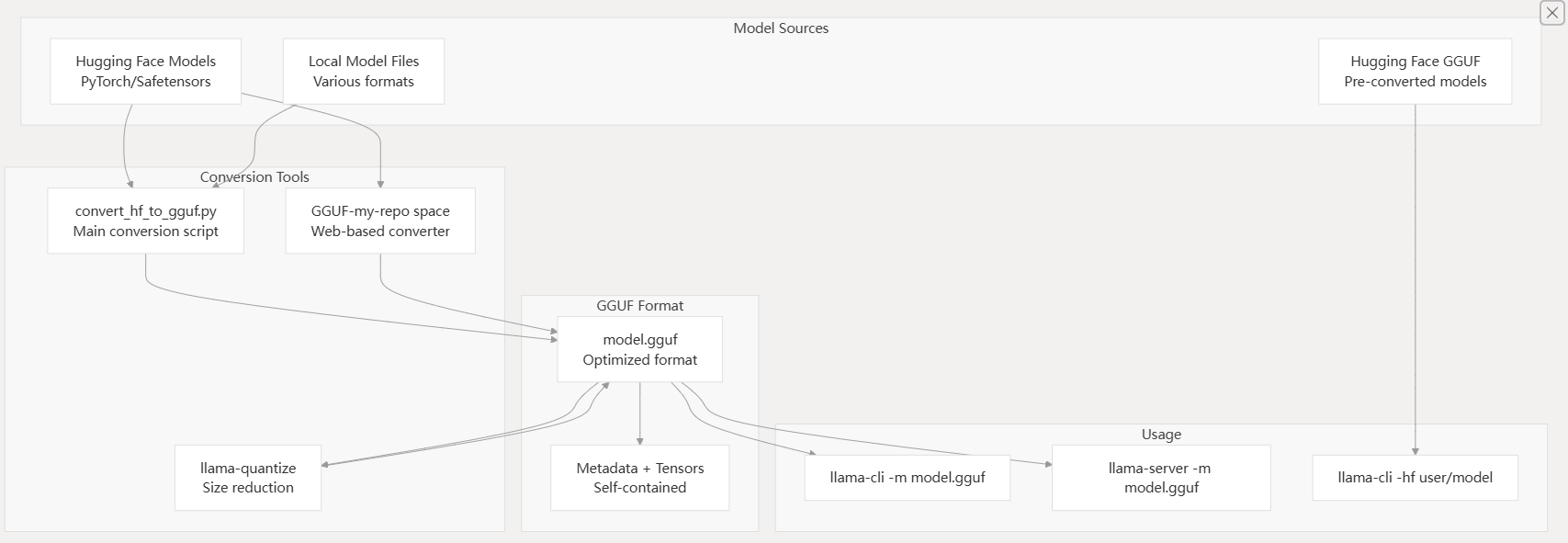
The simplest approach is using the -hf flag to download models directly from Hugging Face:
# Download and run a pre-converted GGUF model
llama-cli -hf ggml-org/gemma-3-1b-it-GGUF

# Start server with direct download
llama-server -hf ggml-org/gemma-3-1b-it-GGUF
The MODEL_ENDPOINT environment variable can be set to use alternative model repositories like ModelScope.
For models not available in GGUF format, use the conversion script:
# Convert from Hugging Face format
python convert_hf_to_gguf.py /path/to/model --outfile model.gguf

# Quantize to reduce size
llama-quantize model.gguf model-q4_0.gguf q4_0
Models from various sources can be converted to GGUF format using Python conversion scripts:
Basic Usage
llama.cpp provides several command-line tools for different use cases. Understanding the relationship between these tools helps choose the right one for your needs.
CLI Tools and Their Relationships
-
获取模型权重:下载所需的大语言模型权重(例如 LLaMA、Mistral),并将其放置在本地目录中(例如
./models)。# Example for LLaMA ls ./models # Expected output: llama-2-7b tokenizer_checklist.chk tokenizer.model -
安装依赖项:转换脚本需要 Python 依赖项。
python3 -m pip install -r requirements.txt(
requirements.txt文件位于仓库的根目录。) -
构建工具:编译 C/C++ 工具,如
llama-quantize、llama-cli和llama-batched-bench。(构建说明通常可以在CMakeLists.txt或特定的构建文档如docs/build.md中找到,尽管在提供的 README 片段中未详细说明)。 -
转换模型:使用
convert_hf_to_gguf.py将原始模型转换为 FP16 GGUF 格式。 -
量化模型(可选但推荐):使用
llama-quantize来减小模型大小和精度。 -
运行推理/基准测试:使用
llama-cli进行文本生成,或使用llama-batched-bench进行性能测试。
Most models with built-in chat templates automatically activate conversation mode:
# Automatic chat mode detection
llama-cli -m model.gguf

# Manual chat mode with custom template
llama-cli -m model.gguf -cnv --chat-template chatml
The CLI detects chat-capable models and enables interactive conversation automatically. Custom chat templates can be specified using the --chat-template parameter.
For simple text completion without conversation context:
# Single completion
llama-cli -m model.gguf -p "The meaning of life is" -n 128 -no-cnv

# With grammar constraints
llama-cli -m model.gguf -n 256 --grammar-file grammars/json.gbnf -p 'Request: schedule a call at 8pm; Command:'
The -no-cnv flag explicitly disables conversation mode for completion tasks. Grammar files in grammars/ directory provide structured output constraints.
Start an OpenAI-compatible HTTP server for API access:
# Basic server on port 8080
llama-server -m model.gguf --port 8080

# Multi-user server with parallel processing
llama-server -m model.gguf -c 16384 -np 4

# Server with speculative decoding
llama-server -m model.gguf -md draft.gguf
The server provides endpoints at /v1/chat/completions and includes a web UI accessible via browser at http://localhost:8080.
Verification Steps
After installation, verify that llama.cpp is working correctly:
- Tool Availability
# Check CLI tools are installed
llama-cli --help
llama-server --help
llama-bench --help
- Model Download Test
# Test model download and basic inference
llama-cli -hf ggml-org/gemma-3-1b-it-GGUF -p "Hello, world!" -n 10
- Server Functionality
# Start server in background
llama-server -hf ggml-org/gemma-3-1b-it-GGUF --port 8080 &

# Test API endpoint
curl http://localhost:8080/v1/models
- Backend Detection
# Check available backends
llama-bench -m model.gguf
The benchmark output shows which backends (CPU, Metal, CUDA, Vulkan) are active and their performance characteristics.
使用 llama-batched-bench 进行基准测试
llama-batched-bench 工具用于对 llama.cpp 的批量解码性能进行基准测试。这对于理解系统在同时处理多个序列(生产环境中的常见场景)时的性能至关重要。
该工具位于 tools/batched-bench/batched-bench.cpp。
2.1. 操作模式
llama-batched-bench 有两种主要模式用于处理批处理中的提示:
- 提示不共享:批处理中的每个序列都有其自己独立的提示。总 KV 缓存大小 (
N_KV) 将为B * (PP + TG),其中B是批处理大小,PP是提示长度,TG是生成的令牌数。 - 提示共享:批处理中的所有序列使用一个共同的提示。总 KV 缓存大小 (
N_KV) 将为PP + B * TG。
2.2. 用法示例
要使用 llama-batched-bench,你需要先构建它(如果你从根目录运行 cmake --build . --config Release 或 make,它通常会与其他工具一起构建)。
# General usage structure ./llama-batched-bench -m model.gguf -c <context_size> -b <batch_size> -ub <upper_batch_size> -npp <prompt_lengths> -ntg <tokens_to_generate> -npl <parallel_levels> [-pps] # Example: LLaMA 7B, F16, N_KV_MAX = 16384 (8GB), prompt not shared ./llama-batched-bench -m ./models/llama-7b/ggml-model-f16.gguf -c 16384 -b 2048 -ub 512 -ngl 99 # Example: LLaMA 7B, Q8_0, N_KV_MAX = 16384 (8GB), prompt is shared ./llama-batched-bench -m ./models/llama-7b/ggml-model-q8_0.gguf -c 16384 -b 2048 -ub 512 -ngl 99 -pps
参数:
-m <model.gguf>:GGUF 模型文件的路径。-c <context_size>:上下文大小。-b <batch_size>:总批处理大小。-ub <upper_batch_size>:ubatching 中批处理大小的上限。-npp <prompt_lengths>:逗号分隔的待测试提示长度列表。-ntg <tokens_to_generate>:逗号分隔的待生成令牌数量列表。-npl <parallel_levels>:逗号分隔的并行解码级别列表。-ngl <gpu_layers>:要卸载到 GPU 的层数(如果适用)。-pps:使用共享提示模式。如果不存在此参数,则使用“提示不共享”模式。
Next Steps
Once you have llama.cpp running successfully:
- Advanced Configuration: See Installation for backend-specific builds (CUDA, Metal, Vulkan)
- CLI Usage: See Basic Usage for detailed command-line options and workflows
- Server Deployment: See HTTP Server for production server setup and API integration
- Model Management: See Model Management for GGUF format details and conversion workflows
- Performance Optimization: See Backend System for hardware acceleration options
- Development: See Development for building custom applications with the libllama API
The tools/ directory contains additional utilities for specific use cases, while examples/ provides sample code for integrating llama.cpp into custom applications.