2
Orgfanizing
if you properly organize threads using the right grid and block size, it can make a big impact on kernel performance
Indexing Matrices with Blocks and Threads
Typically, a matrix is stored linearly in global memory with a row-major approach.
In a matrix addition kernel, a thread is usually assigned one data element to process. Accessing the assigned data from global memory using block and thread index is the first issue you need to solve. Typically, there are three kinds of indices for a 2D case you need to manage:
- Thread and block index
- Coordinate of a given point in the matrix
- Offset in linear global memory
MANAGING DEVICES
6 Streaming and Concurrency
Generally speaking, there are two levels of concurrency in CUDA C programming: ➤ Kernel level concurrency ➤ Grid level concurrency
Up to this point, your focus has been solely on kernel level concurrency, in which a single task, or kernel, is executed in parallel by many threads on the GPU. Several ways to improve kernel performance have been covered from the programming model, execution model, and memory model points-of-view.
This chapter will examine grid level concurrency. In grid level concurrency, multiple kernel launches are executed simultaneously on a single device, often leading to better device utilization.
INTRODUCING STREAMS AND EVENTS
A CUDA stream refers to a sequence of asynchronous CUDA operations that execute on a device in the order issued by the host code. A stream encapsulates these operations, maintains their ordering, permits operations to be queued in the stream to be executed after all preceding operations, and allows for querying the status of queued operations. These operations can include host-device data transfer, kernel launches, and most other commands that are issued by the host but handled by the device. The execution of an operation in a stream is always asynchronous with respect to the host. The CUDA runtime will determine when that operation is eligible for execution on the device. It is your responsibility to use CUDA APIs to ensure an asynchronous operation has completed before using the result. While operations within the same CUDA stream have a strict ordering, operations in different streams have no restriction on execution order. By using multiple streams to launch multiple simultaneous kernels, you can implement grid level concurrency. Because all operations queued in a CUDA stream are asynchronous, it is possible to overlap their execution with other operations in the host-device system. Doing so allows you to hide the cost of performing those operations by performing other useful work at the same time.
Throughout this book, a typical pattern in CUDA programming has been:
- Move input data from the host to the device.
- Execute a kernel on the device.
- Move the result from the device back to the host.
In many cases, more time is spent executing the kernel than transferring data. In these situations, you may be able to completely hide CPU-GPU communication latency. By dispatching kernel execution and data transfer into separate streams, these operations can be overlapped, and the total elapsed time of the program can be shortened. Streams can be used to implement pipelining or double buffering at the granularity of CUDA API calls.
The functions in the CUDA API can generally be classified as either synchronous or asynchronous. Functions with synchronous behavior block the host thread until they complete. Functions with asynchronous behavior return control to the host immediately after being called. Asynchronous functions and streams are the two basic pillars on which you build grid-level concurrency in CUDA.
While from a software point of view CUDA operations in different streams run concurrently; that may not always be the case on physical hardware. Depending on PCIe bus contention or the availability of per-SM resources, different CUDA streams may still need to wait for each other in order to complete.
CUDA Streams
All CUDA operations (both kernels and data transfers) either explicitly or implicitly run in a stream. There are two types of streams: ➤ Implicitly declared stream (NULL stream) ➤ Explicitly declared stream (non-NULL stream)
The NULL stream is the default stream that kernel launches and data transfers use if you do not explicitly specify a stream. All examples in the previous chapters of this book used the NULL or default stream. On the other hand, non-null streams are explicitly created and managed. If you want to overlap different CUDA operations, you must use non-null streams. Asynchronous, stream-based kernel launches and data transfers enable the following types of coarse-grain concurrency:
➤ Overlapped host computation and device computation ➤ Overlapped host computation and host-device data transfer ➤ Overlapped host-device data transfer and device computation ➤ Concurrent device computation
Consider the following code snippet using the default stream:
cudaMemcpy(..., cudaMemcpyHostToDevice);
kernel<<<grid, block>>>(...);
cudaMemcpy(..., cudaMemcpyDeviceToHost);
To understand the behavior of a CUDA program, you should always consider it from the viewpoint of both the device and the host.
- From the device perspective, all three operations in the previous code segment are issued to the default stream, and are executed in the order that they were issued. The device has no awareness of any other host operations being performed.
- From the host perspective, each data transfer is synchronous and forces idle host time while waiting for them to complete. The kernel launch is asynchronous, and so the host application almost immediately resumes execution afterwards, regardless of whether the kernel completed or not.
- This default asynchronous behavior for kernel launches makes it straightforward to overlap device and host computation.
Data transfers can also be issued asynchronously; however, you must explicitly set the CUDA stream to place them in. The CUDA runtime provides the following asynchronous version of cudaMemcpy:
cudaError_t cudaMemcpyAsync(void* dst, const void* src, size_t count, cudaMemcpyKind kind, cudaStream_t stream = 0);Note the added stream identifier as the fifth argument. By default, the stream identifier is set to the default stream. This function is asynchronous with respect to the host, so control returns to the host immediately after the call is issued. You can easily associate a copy operation with a non-null stream. However, first you will need to create a non-null stream using:
cudaError_t cudaStreamCreate(cudaStream_t* pStream);cudaStreamCreate creates a non-null stream that you manage explicitly. The stream returned in pStream can then be used as the stream argument to cudaMemcpyAsync and other asynchronous CUDA API functions. One common point of confusion when using asynchronous CUDA functions is that they may return error codes from previously launched asynchronous operations.
The API call returning an error is not necessarily the call that caused the error.
When performing an asynchronous data transfer, you must use pinned (or non-pageable) host memory. Pinned memory can be allocated using either cudaMallocHost or cudaHostAlloc:
cudaError_t cudaMallocHost(void **ptr, size_t size);
cudaError_t cudaHostAlloc(void **pHost, size_t size, unsigned int flags);
By pinning allocations in host virtual memory, you force its physical location in CPU memory to remain constant throughout the lifetime of an application. Otherwise, the operating system is free to change the physical location of host virtual memory at any time. If an asynchronous CUDA transfer were performed without pinned host memory, it would be possible for the operating system to physically move an array while the CUDA runtime was transferring it to the device, resulting in undefined behavior.
- To launch a kernel in a non-default stream, you must provide a stream identifier as the fourth parameter in the kernel execution configuration:
kernel_name<<<grid, block, sharedMemSize, stream>>>(argument list); - A non-default stream is declared as follows:
cudaStream_t stream; - Non-default streams can be created using:
cudaStreamCreate(&stream); - The resources of a stream can be released using:
cudaError_t cudaStreamDestroy(cudaStream_t stream);
If there is still pending work in a stream when cudaStreamDestroy is called on that stream, cudaStreamDestroy returns immediately and the resources associated with the stream are released automatically when all work in the stream has completed.
Since all CUDA stream operations are asynchronous, the CUDA API provides two functions that allow you to check if all operations in a stream have completed:
cudaError_t cudaStreamSynchronize(cudaStream_t stream); forces the host to block until all operations in the provided stream have completed.
cudaError_t cudaStreamQuery(cudaStream_t stream); checks if all operations in a stream have completed, but does not block the host if they have not completed. cudaStreamQuery returns cudaSuccess if all operations are complete or cudaErrorNotReady if one or more operation is still executing or pending execution.
To help illustrate how CUDA streams are used in practice, the following is a common pattern for dispatching CUDA operations to multiple streams.
for (int i = 0; i < nStreams; i++) {
	int offset = i * bytesPerStream;
	cudaMemcpyAsync(&d_a[offset], &a[offset], bytePerStream, streams[i]);
	kernel<<grid, block, 0, streams[i]>>(&d_a[offset]);
	cudaMemcpyAsync(&a[offset], &d_a[offset], bytesPerStream, streams[i]);
}
for (int i = 0; i < nStreams; i++) { cudaStreamSynchronize(streams[i]); }
Figure 6-1 illustrates a simple timeline of CUDA operations using three streams. Both data transfer and kernel computation are evenly distributed among three concurrent streams.
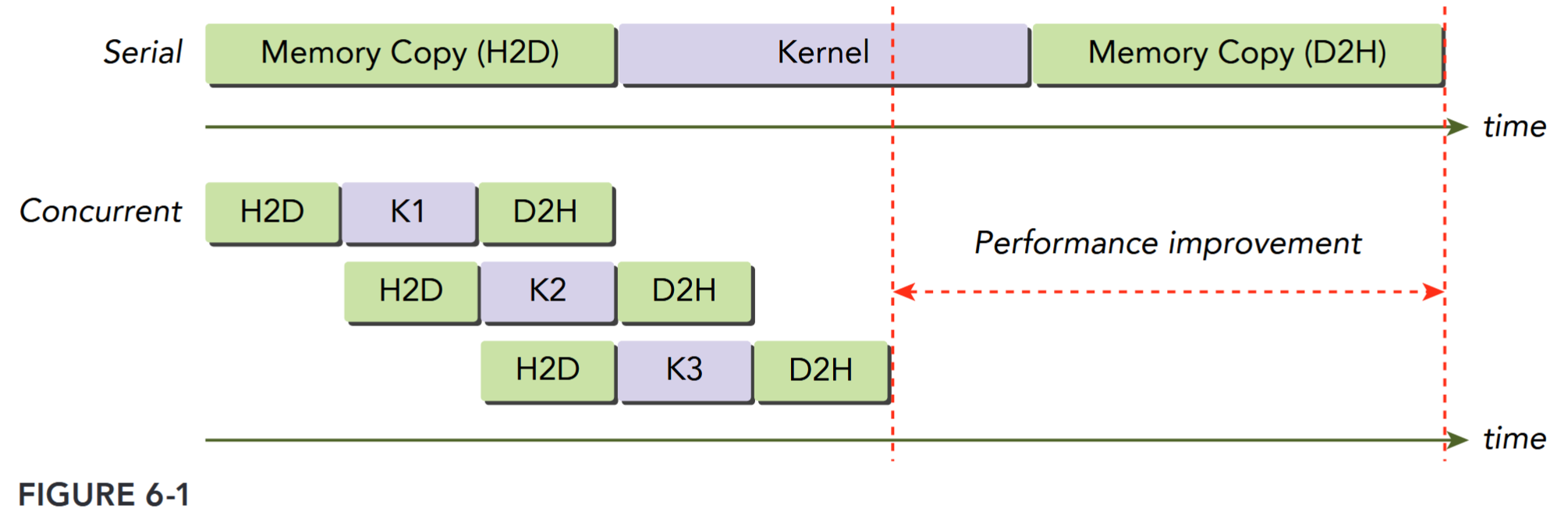
You might notice that the data transfer operations are not executed concurrently in Figure 6-1, even though they are issued in separate streams. This contention is caused by a shared resource: the PCIe bus. While these operations are independent from the point-of-view of the programming model, because they share a common hardware resource their execution must be serialized. Devices with a duplex PCIe bus can overlap two data transfers, but they must be in different streams and in different directions. In Figure 6-1, observe that data transfer from the host to the device in one stream is overlapped with data transfer from the device to the host in another.
The maximum number of concurrent kernels is device-dependent. Fermi devices support 16-way concurrency, and Kepler devices support 32-way concurrency. The number of concurrent kernels is further limited by available compute resource on devices, such as shared memory and registers. You will explore these limitations through examples later in this chapter.
Stream Scheduling TODO
Stream Priorities TODO
CUDA Events
An event in CUDA is essentially a marker in a CUDA stream associated with a certain point in the flow of operations in that stream. You can use events to perform the following two basic tasks:
➤ Synchronize stream execution
➤ Monitor device progress
The CUDA API provides functions that allow you to insert events at any point in a stream as well as query for event completion. An event recorded on a given stream will only be satisfied (that is, complete) when all preceding operations in the same stream have completed. Events specified on the default stream apply to all preceding operations in all CUDA streams.
Creation and Destruction
An event is declared as follows: cudaEvent_t event;. Once declared, the event can be created using: cudaError_t cudaEventCreate(cudaEvent_t* event);. An event can be destroyed using: cudaError_t cudaEventDestroy(cudaEvent_t event); If the event has not yet been satisfied when cudaEventDestroy is called, the call returns immediately and the resources associated with that event are released automatically when the event is marked complete.