Multi-GPU
WHAT’S IN THIS CHAPTER?
- Managing multiple GPUs
- Executing kernels across multiple GPUs
- Overlapping computation and communication between GPUs
- Synchronizing across GPUs
- Exchanging data using CUDA-aware MPI
- Exchanging data using CUDA-aware MPI with GPUDirect RDMA
- Scaling applications across a GPU-accelerated cluster
- Understanding CPU and GPU affinity
on across multiple GPUs within a compute node, or across multiple GPU-accelerated nodes. CUDA provides a number of features to facilitate multi-GPU programming, including multi-device management from one or more processes, direct access to other devices’ memory using Unified Virtual Addressing (UVA) and GPUDirect, and computation-communication overlap across multiple devices using streams and asynchronous functions. In this chapter, you will learn the necessary skills to:
- Manage and execute kernels on multiple GPUs.
- Overlap computation and communication across multiple GPUs.
- Synchronize execution across multiple GPUs using streams and events.
- Scale CUDA-aware MPI applications across a GPU-accelerated cluster.
You will see, through several examples, how applications can achieve near linear scalability when executing on multiple devices.
硬件互联与拓扑
硬件互联方式和拓扑一直在发展,见 分布式互联技术总览。这里只讲述多年以前的 PCIe 技术。
MOVING TO MULTIPLE GPUS
The most common reasons for adding multi-GPU support to an application are:
- Problem domain size: Existing data sets are too large to fit into the memory of a single GPU.
- Throughput and efficiency: If a single task fits within a single GPU, you may be able to increase the throughput of an application by processing multiple tasks concurrently using multiple GPUs.
A multi-GPU system allows you to amortize the power consumption of a server node across GPUs by delivering more performance for a given unit of power consumed, while boosting throughput. When converting your application to take advantage of multiple GPUs, it is important to properly design inter-GPU communication. The efficiency of inter-GPU data transfers depends on how GPUs are connected within a node, and across a cluster. There are two types of connectivity in multi-GPU systems:
- Multiple GPUs connected over the bus (PCIe, NVLink, etc.) in a single node
- Multiple GPUs connected over a network switch in a cluster
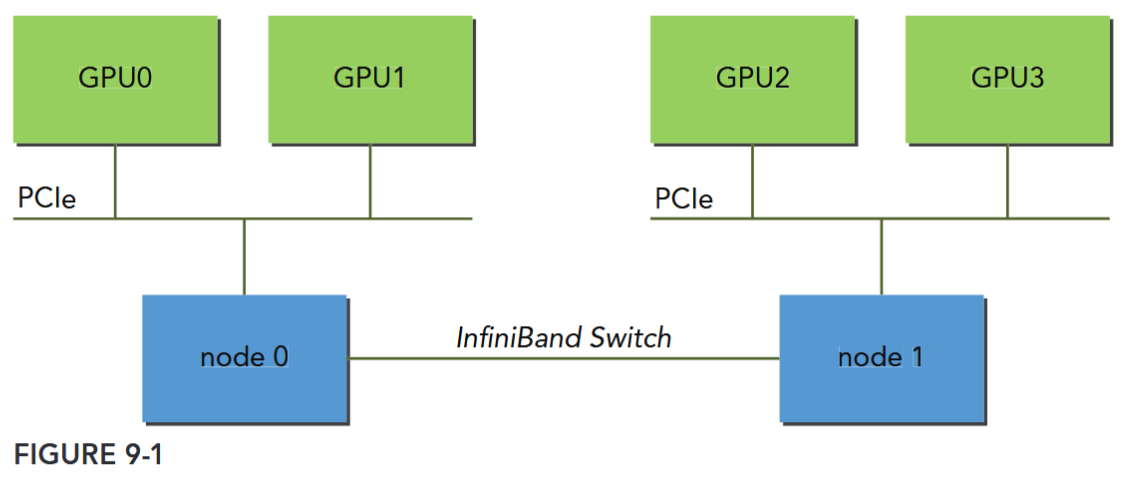
These connection topologies are not mutually exclusive. Figure 9-1 illustrates a simplified topology for a cluster with two compute nodes. GPU0 and GPU1 are connected via the PCIe bus on node0. Similarly, GPU2 and GPU3 are connected via the PCIe bus on node1. The two nodes (node0 and node1) are connected to each other through InfiniBand Switch.
Executing on Multiple GPUs
The CUDA runtime API supports several ways of managing devices and executing kernels across multi-GPU systems. A single host thread can manage multiple devices. In general, the first step is determining the number of CUDA-enabled devices available in a system using the following function:
__host__ __device__ cudaError_t cudaGetDeviceCount ( int* count )
/* Returns the number of compute-capable devices.
###### Parameters
count
- Returns the number of devices with compute capability greater or equal to 2.0
*/
__host__ cudaError_t cudaGetDeviceProperties ( cudaDeviceProp* prop, int device )
/*
Returns information about the compute-device.
###### Parameters
prop
- Properties for the specified device
device
- Device number to get properties for
*/When implementing a CUDA application that works with multiple GPUs, you must explicitly designate which GPU is the current target for all CUDA operations. You can set the current device with the following function:
__host__ cudaError_t cudaSetDevice ( int device )
/*
Set device to be used for GPU executions.
###### Parameters
device
- Device on which the active host thread should execute the device code.
*/This function sets the device with identifier id as the current device. This function will not cause synchronization with other devices, and therefore is a low-overhead call. You can use this function to select any device from any host thread at any time. Valid device identifiers start from zero and span to ngpus-1. If cudaSetDevice is not explicitly called before the first CUDA API call is made, the current device is automatically set to device 0.
Once a current device is selected, all CUDA operations will be applied to that device.
Multiple GPUs can be used at once from:
- A single CPU thread in one node
- Multiple CPU threads in one node
- Multiple CPU processes in one nodeMultiple CPU processes across multiple nodes
The following code snippet illustrates how to execute kernels and memory copies from a single host thread, using a loop to iterate over devices:
for (int i = 0; i < ngpus; i++) {
// set the current device
cudaSetDevice(i);
// execute kernel on current device
kernel<<<grid, block>>>(...);
// asynchronously transfer data between the host and current device
cudaMemcpyAsync(...); }
if kernels or transfers issued by the current thread are still executing on the current device, because cudaSetDevice does not cause host synchronization.
Peer-to-Peer Communication
Kernels executing in 64-bit applications on devices with compute capability 2.0 and higher can directly access the global memory of any GPU connected to the same PCIe root node. To do so, you must use the CUDA peer-to-peer (P2P) API to enable direct inter-device communication.
There are two modes supported by the CUDA P2P APIs that allow direct communication between GPUs:
- Peer-to-peer Access: Directly load and store addresses within a CUDA kernel and across GPUs.
- Peer-to-peer Transfer: Directly copy data between GPUs.
If two GPUs are connected to different PCIe root nodes within a system, then direct peer-to-peer access is not supported and the CUDA P2P API will inform you of that. You can still use the CUDA P2P API to perform peer-to-peer transfer between these devices, but the driver will transparently transfer data through host memory for those transactions rather than directly across the PCIe bus.
SCALING APPLICATIONS ACROSS GPU CLUSTERS
MPI (Message Passing Interface) is a standardized and portable API for communicating data via messages between distributed processes. In most MPI implementations, library routines are called directly from C or other languages. MPI is fully compatible with CUDA. There are two types of MPI implementations that support moving data between GPUs on different nodes: Traditional MPI and CUDA-aware MPI. With traditional MPI, only the contents of host memory can be transmitted directly by MPI functions. The contents of GPU memory must first be copied back to host memory using the CUDA API before MPI can be used to communicate that data to another node. With CUDA-aware MPI, you can pass GPU memory directly to MPI functions without staging that data through host memory.
Check the available CUDA-aware MPI implementations ( OpenMPI).