本文参考:
- NVIDIA CUDA C++ Programming Guide 第 2、3、4、5 章
- Professional CUDA C Programming 第 5 章,虽然这本书讲的 Fermi 架构比较老,仍有助于学习 GPU 编程架构最核心的部分,不过仍需注意一些特性的时效性。
- 这部分也会涉及很多硬件架构和性能调优的内容,可结合后面章节一起学习。
- Programming Interface 中给出了对 CUDA C++ 的宽泛描述。
- CUDA samples 中可以找到本章和下一章中使用的向量加法示例的完整代码。
2. 编程模型
概述
Introducing the CUDA Programming Model
Programming models present an abstraction of computer architectures that act as a bridge between an application and its implementation on available hardware. Figure 2-1 illustrates the important layers of abstraction that lie between the program and the programming model implementation. The communication abstraction is the boundary between the program and the programming model implementation, which is realized through a compiler or libraries using privileged hardware primitives and the operating system. The program, written for a programming model, dictates how components of the program share information and coordinate their activities. The programming model provides a logical view of specific computing architectures. Typically, it is embodied in a programming language or programming environment.
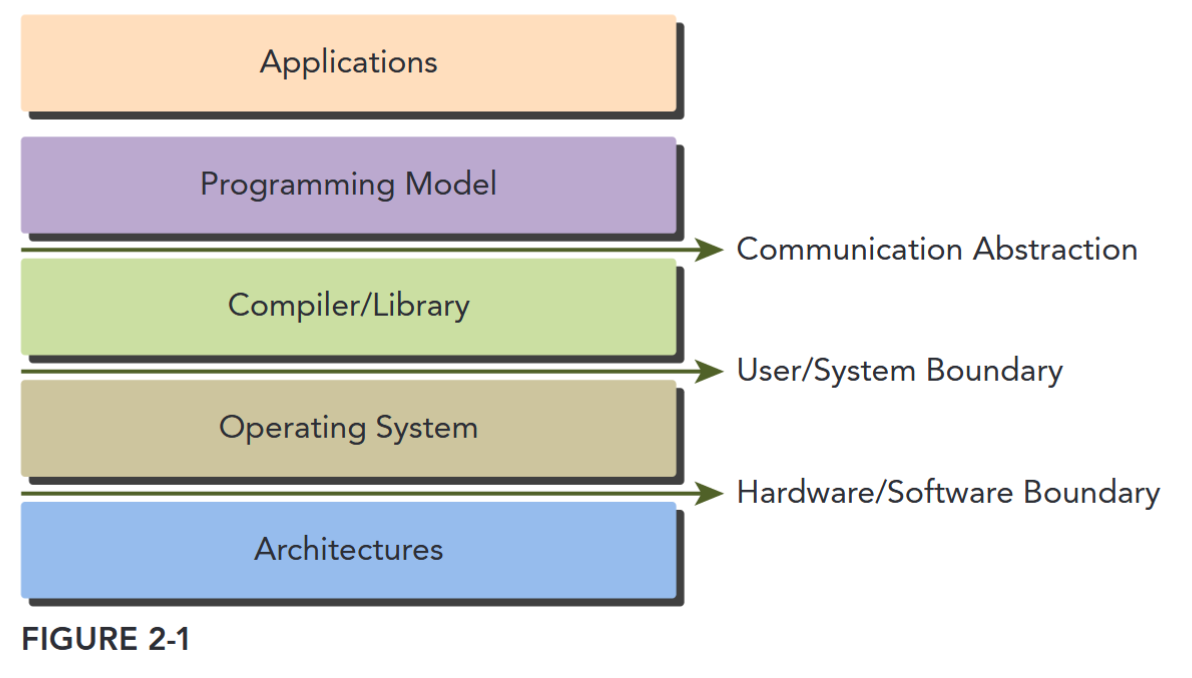
In addition to sharing many abstractions with other parallel programming models, the CUDA programming model provides the following special features to harness the computing power of GPU architectures.
- A way to organize threads on the GPU through a hierarchy structure
- A way to access memory on the GPU through a hierarchy structure
CUDA 两大特点
CUDA 编程模型有两个特色功能,一是通过一种层次结构来组织线程,二是通过层次结构来组织内存的访问。这两点和我们平时 CPU 编程是有较大区别的。
第一点是线程层次,一般 CPU 一个核只支持一到两个硬件线程,而 GPU 往往在硬件层面上就支持同时成百上千个并发线程。不过这也要求我们在 GPU 编程中更加高效地管理这些线程,以达到更高的运行效率。在 CUDA 编程中,线程是通过线程网格(Grid)、线程块(Block)、线程束(Warp)、线程(Thread)。
第二点是内存模型。与 CPU 编程不同,GPU 中的各级缓存以及各种内存是可以软件控制的,在编程时我们可以手动指定变量存储的位置。具体而言,这些内存包括寄存器、共享内存、常量内存、全局内存等。这就造成了 CUDA 编程中有很多内存使用的小技巧,比如我们要尽量使用寄存器,尽量将数据声明为局部变量。而当存在着数据的重复利用时,可以把数据存放在共享内存里。而对于全局内存,我们需要注意用一种合理的方式来进行数据的合并访问,以尽量减少设备对内存子系统再次发出访问操作的次数。
From the perspective of a programmer, you can view parallel computation from different levels, such as:
- Domain level
- Logic level
- Hardware level
领域层面,关注如何分解数据和功能来并行执行;编程阶段需要关注如何组织并发线程,即思考逻辑层面的正确性;硬件层面需要理解线程如何映射到各个核心来提升性能。
CUDA Programming Structure
The CUDA programming model enables you to execute applications on heterogeneous computing systems by simply annotating code with a small set of extensions to the C programming language. A heterogeneous environment consists of CPUs complemented by GPUs, each with its own memory separated by a PCI-Express bus. Therefore, you should note the following distinction:
- Host: the CPU and its memory (host memory)
- Device: the GPU and its memory (device memory)
Starting with CUDA 6, NVIDIA introduced a programming model improvement called Unified Memory, which bridges the divide between host and device memory spaces. This improvement allows you to access both the CPU and GPU memory using a single pointer, while the system automatically migrates the data between the host and device. TODO: super-link
A key component of the CUDA programming model is the kernel — the code that runs on the GPU device. As the developer, you can express a kernel as a sequential program. Behind the scenes, CUDA manages scheduling programmer-written kernels on GPU threads.
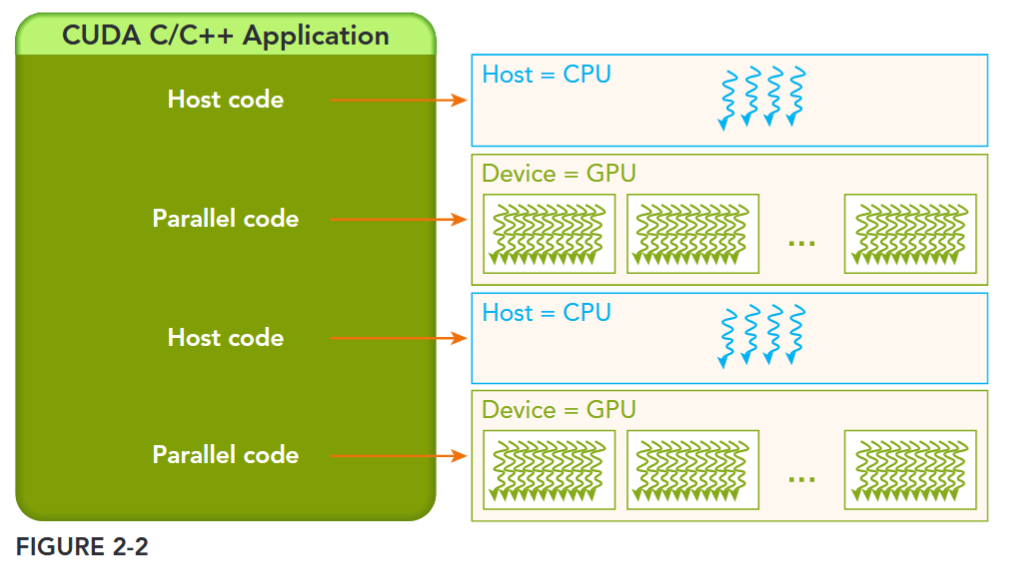
The host can operate independently of the device for most operations. When a kernel has been launched, control is returned immediately to the host, freeing the CPU to perform additional tasks complemented by data parallel code running on the device. The CUDA programming model is primarily asynchronous so that GPU computation performed on the GPU can be overlapped with host-device communication. A typical CUDA program consists of serial code complemented by parallel code. As shown in Figure 2-2, the serial code (as well as task parallel code) is executed on the host, while the parallel code is executed on the GPU device. The host code is written in ANSI C, and the device code is written using CUDA C. You can put all the code in a single source file, or you can use multiple source files to build your application or libraries. The NVIDIA C Compiler (nvcc) generates the executable code for both the host and device.
Managing Memory
More about memory see 2-2存储模型
内存管理在传统串行程序是非常常见的,寄存器空间,栈空间内的内存由机器自己管理,堆空间由用户控制分配和释放,CUDA 程序同样,只有 CUDA 提供的 API 可以分配管理设备上的内存,当然也可以用 CUDA 管理主机上的内存,主机上的传统标准库也能完成主机内存管理。
The CUDA programming model assumes a system composed of a host and a device, each with its own separate memory. Kernels operate out of device memory. To allow you to have full control and achieve the best performance, the CUDA runtime provides functions to allocate device memory, release device memory, and transfer data between the host memory and device memory.
下面表格有一些主机 API 和 CUDA C 的 API 的对比:
| 标准 C 函数 | CUDA C 函数 | 说明 |
|---|---|---|
| malloc | cudaMalloc | 内存分配 |
| memcpy | cudaMemcpy | 内存复制 |
| memset | cudaMemset | 内存设置 |
| free | cudaFree | 释放内存 |
首先是在 device 上分配内存的 cudaMalloc 函数:
cudaError_t cudaMalloc(void** devPtr, size_t size);这个函数和 C 语言中的 malloc 类似,但是在 device 上申请一定字节大小的显存,其中 devPtr 是指向所分配内存的指针。同时要释放分配的内存使用 cudaFree 函数,这和 C 语言中的 free 函数对应。另外一个重要的函数是负责 host 和 device 之间数据通信的 cudaMemcpy 函数:
cudaError_t cudaMemcpy(void* dst, const void* src, size_t count, cudaMemcpyKind kind)其中 src 指向数据源,而 dst 是目标区域,count 是复制的字节数,其中 kind 控制复制的方向:cudaMemcpyHostToHost, cudaMemcpyHostToDevice, cudaMemcpyDeviceToHost, cudaMemcpyDeviceToDevice,如 cudaMemcpyHostToDevice 将 host 上数据拷贝到 device 上。Figure 2-3 展示了一个简单的 GPU 存储架构以及存储搬运。
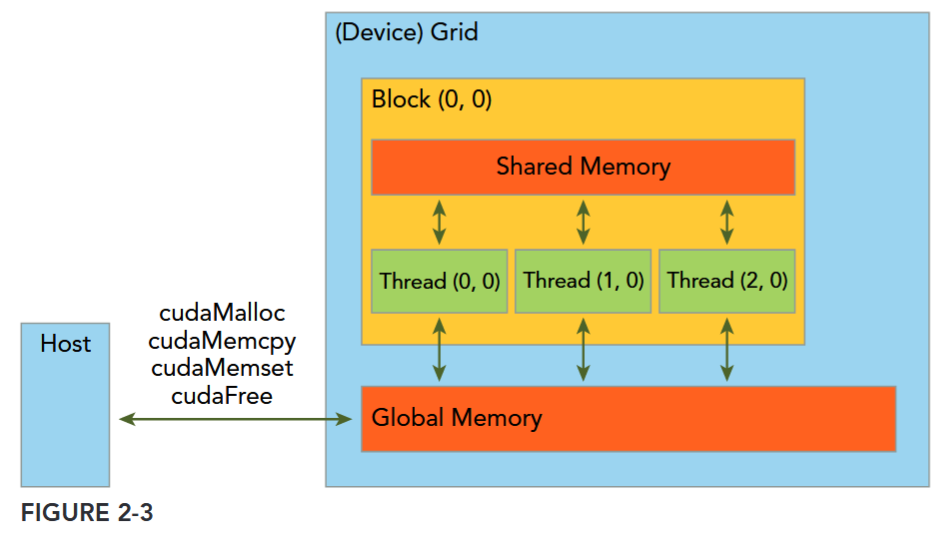
This function exhibits synchronous behavior because the host application blocks until cudaMemcpy returns and the transfer is complete.
Error Handling
Every CUDA call, except kernel launches, returns an error code of an enumerated type cudaError_t. For example, if GPU memory is successfully allocated, it returns: cudaSuccess Otherwise, it returns: cudaErrorMemoryAllocation. You can convert an error code to a human-readable error message
主机和 GPU 是不同的计算单元,它们有各自独立的内存地址空间, 并且不能直接相互访问对方的内存。这意味着,在主机代码中,不能像对待主机内存指针那样直接对指向 GPU 内存的设备指针进行解引用操作,因为主机 CPU 并不能直接访问 GPU 内存。 如果在主机代码中直接对设备指针进行赋值等操作会导致程序出现未定义行为,比如非法内存访问。在运行时,程序往往会崩溃,因为操作系统无法处理这种跨不同内存空间的非法访问请求。 应该使用 CUDA 提供的
cudaMemcpy函数来在主机和设备内存之间安全地传输数据。
线程与执行模型
线程层次
GPU 上有很多并行化的轻量级线程。kernel 在 device 上执行时实际上是启动很多线程,由一个内核启动所产生的所有线程统称一个网格(Grid),同一网格中的所有线程共享相同的全局内存空间。grid 是线程结构的第一层次,而网格又可以分为很多线程块 block,一个线程块里面包含很多线程 Thread,这是第二个层次。线程网格和线程块从逻辑上代表了一个核函数的线程层次结构,这种组织方式可以帮助我们有效地利用资源,优化性能。
All threads spawned by a single kernel launch are collectively called a grid. All threads in a grid share the same global memory space. A grid is made up of many thread blocks. A thread block is a group of threads that can cooperate with each other using:
- Block-local synchronization
- Block-local shared memory
Threads from different blocks cannot cooperate.
Threads rely on the following two unique coordinates to distinguish themselves from each other:
blockIdx(block index within a grid)threadIdx(thread index within a block)
These variables appear as built-in, pre-initialized variables that can be accessed within kernel functions. When a kernel function is executed, the coordinate variables blockIdx and threadIdx are assigned to each thread by the CUDA runtime. Based on the coordinates, you can assign portions of data to different threads.
The coordinate variable is of type uint3, a CUDA built-in vector type, derived from the basic integer type. It is a structure containing three unsigned integers, and the 1st, 2nd, and 3rd components are accessible through the fields x, y, and z respectively.
blockIdx.x, blockIdx.y, blockIdx.z,
threadIdx.x, threadIdx.y, threadIdx.z,
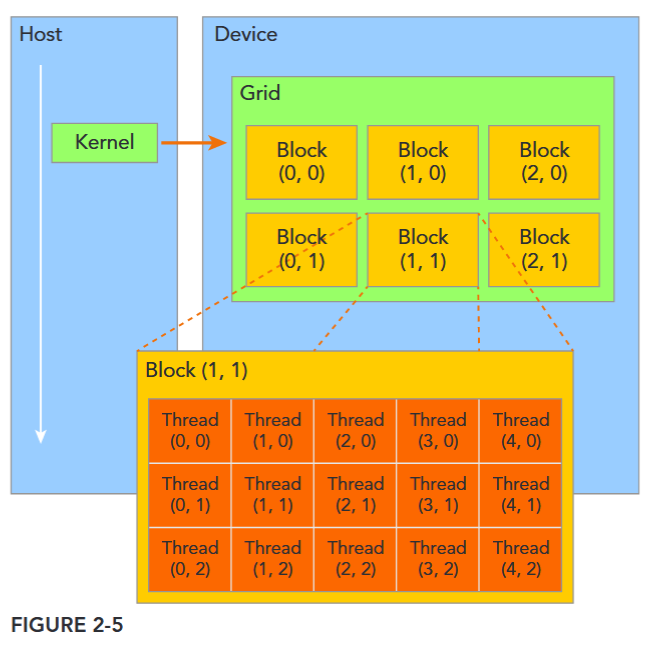
CUDA organizes grids and blocks in three dimensions. Figure 2-5 shows an example of a thread hierarchy structure with a 2D grid containing 2D blocks. The dimensions of a grid and a block are specified by the following two built-in variables:
blockDim(block dimension, measured in threads)gridDim(grid dimension, measured in blocks)
These variables are of type dim3, an integer vector type based on uint3 that is used to specify dimensions. When defining a variable of type dim3, any component left unspecified is initialized to 1. Each component in a variable of type dim3 is accessible through its x, y, and z fields, respectively, as shown in the following example: blockDim.x blockDim.y blockDim.z
GRID AND BLOCK DIMENSIONS: Usually, a grid is organized as a 2D array of blocks, and a block is organized as a 3D array of threads. Both grids and blocks use the dim3 type with three unsigned integer fields. The unused fields will be initialized to 1 and ignored.
There are two distinct sets of grid and block variables in a CUDA program: manually-defined
dim3data type and pre-defineduint3data type. On the host side, you define the dimensions of a grid and block using a dim3 data type as part of a kernel invocation. When the kernel is executing, the CUDA runtime generates the corresponding built-in, pre-initialized grid, block, and thread variables, which are accessible within the kernel function and have type uint3. The manually-defined grid and block variables for the dim3 data type are only visible on the host side, and the built-in, pre-initialized grid and block variables of the uint3 data type are only visible on the device side.
It is important to distinguish between the host and device access of grid and block variables. For example, using a variable declared as block from the host, you define the coordinates and access them as follows:
block.x, block.y, and block.zOn the device side, you have pre-initialized, built-in block size variable available as:blockDim.x, blockDim.y, and blockDim.zIn summary, you define variables for grid and block on the host before launching a kernel, and access them there with the x, y and z fields of the vector structure from the host side. When the kernel is launched, you can use the pre-initialized, built-in variables within the kernel.
简单区分一下 host 和 device 定义的这些变量的使用差异。
线程两层组织结构如下图所示,这是一个 gird 和 block 均为 2-dim 的线程组织。grid 和 block 都是定义为 dim3 类型的变量,dim3 可以看成是包含三个无符号整数(x,y,z)成员的结构体变量,在定义时,缺省值初始化为 1。因此 grid 和 block 可以灵活地定义为 1-dim,2-dim 以及 3-dim 结构,对于图中结构(主要水平方向为 x 轴),定义的 grid 和 block 如下所示。
A CUDA kernel call is a direct extension to the C function syntax that adds a kernel’s execution configuration inside triple-angle-brackets: kernel_name <<<grid, block>>>(argument list);
By specifying the grid and block dimensions, you configure:
- The total number of threads for a kernel
- The layout of the threads you want to employ for a kernel
再次注意:The threads within the same block can easily communicate with each other, and threads that belong to different blocks cannot cooperate.
dim3 grid(3, 2);
dim3 block(5, 3);
kernel_fun<<< grid, block >>>(prams…);
Kernel 上的两层线程组织结构(2-dim)
grid_dim:网格维度,指定整个网格的大小(车间数量)block_dim:线程块维度,指定每个块的大小(每个车间的工人数)
这两个参数可以是:
- 一维结构:
<<<100, 256>>>→ 100 个块,每块 256 个线程 - 二维结构:
<<<dim3(10, 5), dim3(16, 16)>>>→ 网格 10×5=50 个块,每块 16×16=256 个线程 - 三维结构:常用于图像处理(如 3 D 体积数据)
一个线程需要两个内置的坐标变量 blockIdx,threadIdx) 来唯一标识,它们都是 dim3 类型变量,其中 blockIdx 指明线程所在 grid 中的位置,而 threaIdx 指明线程所在 block 中的位置,如图中的 Thread (1,1) 满足:
threadIdx.x = 1
threadIdx.y = 1
blockIdx.x = 1
blockIdx.y = 1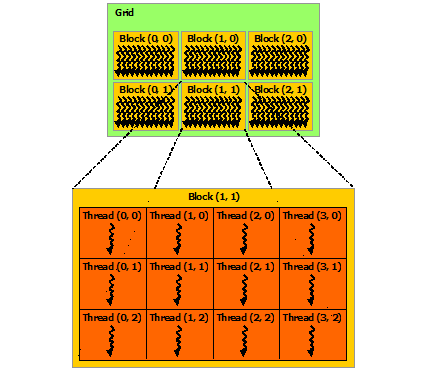
为方便起见,thread Idx 是一个 3 分量 (3-component) 向量,因此可以使用一个一维、二维或三维的线程索引 (thread index) 来识别线程,形成一个具有一个维度、两个维度或三个维度的、由线程组成的块,我们称之为线程块 (thread block)。这提供了一种自然的方法来对某一范围(例如向量、矩阵或空间)内的元素进行访问并调用计算。
一个线程块上的线程是放在同一个流式多处理器(SM) 上的,但是单个 SM 的资源有限,这导致线程块中的线程数是有限制的,现代 GPUs 的线程块可支持的线程数可达 1024 个。有时候,我们要知道一个线程在 block 中的全局 ID,此时就必须还要知道 block 的组织结构,这是通过线程的内置变量 blockDim 来获得。它获取线程块各个维度的大小。
For a given data size, the general steps to determine the grid and block dimensions are:
- Decide the block size.
- Calculate the grid dimension based on the application data size and the block size. To determine the block dimension, you usually need to consider:
- Performance characteristics of the kernel
- Limitations on GPU resources
There are several restrictions on the dimensions of grids and blocks. One of the major limiting factors on block size is available compute resources, such as registers, shared memory, and so on. Some limits can be retrieved by querying the GPU device.
注意需要根据计算资源和算法来规划线程层次。
索引计算
CUDA GPU 有许多并行处理器,这些处理器被分组为流多处理器(Streaming Multiprocessors,简称 SM)。每个 SM 可以运行多个并发线程块,但每个线程块只能在单个 SM 上运行。例如,基于图灵(Turing)GPU 架构的英伟达 T4 GPU 有 40 个 SM 和 2560 个 CUDA 核心,每个 SM 最多可支持 1024 个活动线程。为了充分利用所有这些线程,我应该使用多个线程块启动内核。
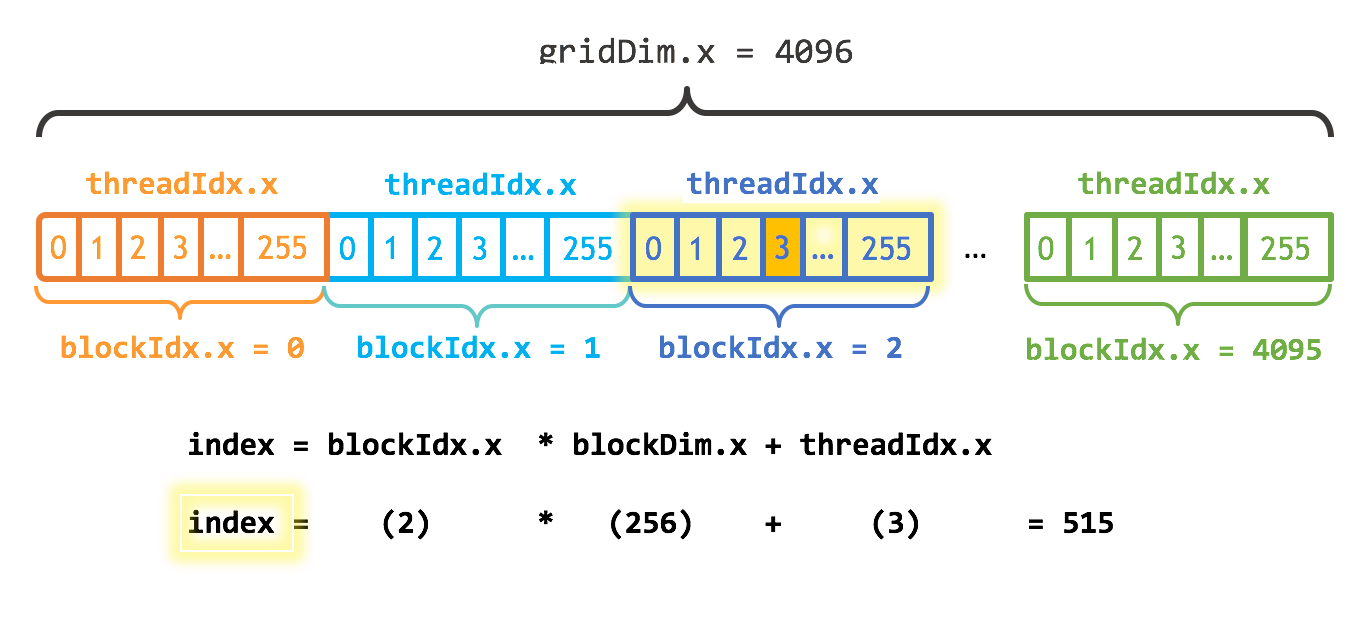
执行配置的第一个参数指定了线程块的数量。并行线程块共同构成了所谓的网格。由于我有 N 个元素需要处理,且每个块有 256 个线程,我只需要计算出至少能得到 N 个线程所需的块数。我只需将 N 除以块大小(如果 N 不是 blockSize 的倍数,要注意向上取整)。
int blockSize = 256;
int numBlocks = (N + blockSize - 1) / blockSize;
add<<<numBlocks, blockSize>>>(N, x, y);
这个内核还将 stride 设置为网格中线程的总数 (blockDim. x * gridDim. x)。在 CUDA 内核中,这种类型的循环通常称为 grid-stride 循环。
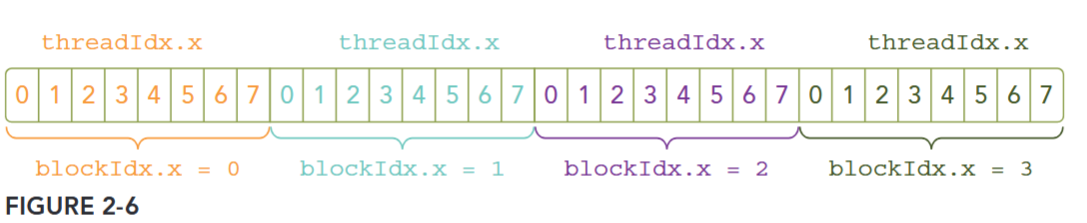
Because the data is stored linearly in global memory, you can use the built-in variables blockIdx.x and threadIdx.x to:
- Identify a unique thread in the grid.
- Establish a mapping between threads and data elements.
Figure 2-6 illustrates the layout of threads in the <<<4, 8>>> configuration.
参考:https://developer.nvidia.com/blog/even-easier-introduction-cuda/
内核
CUDA C++ 通过允许程序员定义称为 kernel 的 C++ 函数来扩展 C++,当调用内核时,由 N 个不同的 CUDA 线程并行执行 N 次,而不是像常规 C++ 函数那样只执行一次。kernel 是 CUDA 中一个重要的概念,kernel 是在 device 上线程中并行执行的函数。
使用 __global__ 声明说明符定义内核,并使用新的 <<<grid, block>>> 执行配置(execution configuration)语法指定内核调用时的 CUDA 线程数(请参阅 C++ 语言扩展)。每个执行内核的线程都有一个唯一的线程 ID 即 thread ID,可以通过内置变量 threadIdx 在内核中访问。
作为说明,以下示例代码使用内置变量 threadIdx 将两个大小为 N 的向量 A 和 B 相加,并将结果存储到向量 C 中:
// Kernel definition
__global__ void VecAdd(float* A, float* B, float* C)
{
    int i = threadIdx.x;
    C[i] = A[i] + B[i];
}

int main()
{
    ...
    // Kernel invocation with N threads
    VecAdd<<<1, N>>>(A, B, C);
    ...
}
这里,执行 VecAdd() 的 N 个线程中的每一个线程都会执行一个加法。
A kernel call is asynchronous with respect to the host thread. After a kernel is invoked, control returns to the host side immediately. You can call the following function to force the host application to wait for all kernels to complete.
cudaError_t cudaDeviceSynchronize(void);Some CUDA runtime APIs perform an implicit synchronization between the host and the device. When you use cudaMemcpy to copy data between the host and device, implicit synchronization at the host side is performed and the host application must wait for the data copy to complete.
cudaError_t cudaMemcpy(void* dst, const void* src, size_t count, cudaMemcpyKind kind);
It starts to copy after all previous kernel calls have completed. When the copy is finished, control returns to the host side immediately.
ASYNCHRONOUS BEHAVIORS
Unlike a C function call, all CUDA kernel launches are asynchronous. Control returns to the CPU immediately after the CUDA kernel is invoked.
线程层次总结
为方便起见,threadIdx 是一个三维向量,线程可通过一维、二维或三维线程索引来标识,从而形成一维、二维或三维的线程块 thread block。这种方式能自然地在向量、矩阵或体积等领域的元素间调用计算。
线程的索引与其线程 ID 的关系很简单:
- 对于一维块,两者相同;
- 对于大小为 的二维块,索引为 的线程的线程 ID 为 ;
- 对于大小为 的三维块,索引为 的线程的线程 ID 为 。
下面的代码例子把两个 的矩阵 和 相加,结果存储到 。
// Kernel definition
__global__ void MatAdd(float A[N][N], float B[N][N],
                       float C[N][N])
{
    int i = threadIdx.x;
    int j = threadIdx.y;
    C[i][j] = A[i][j] + B[i][j];
}

int main()
{
    …
    // Kernel invocation with one block of N * N * 1 threads
    int numBlocks = 1;
    dim3 threadsPerBlock(N, N);
    MatAdd<<<numBlocks, threadsPerBlock>>>(A, B, C);
    …
}
由于一个线程块中的所有线程须驻留在同一个流多处理器核心上,且必须共享该核心有限的内存资源,因此每个线程块的线程数量存在限制。在当前的 GPU 上,一个线程块最多可包含 1024 个线程。
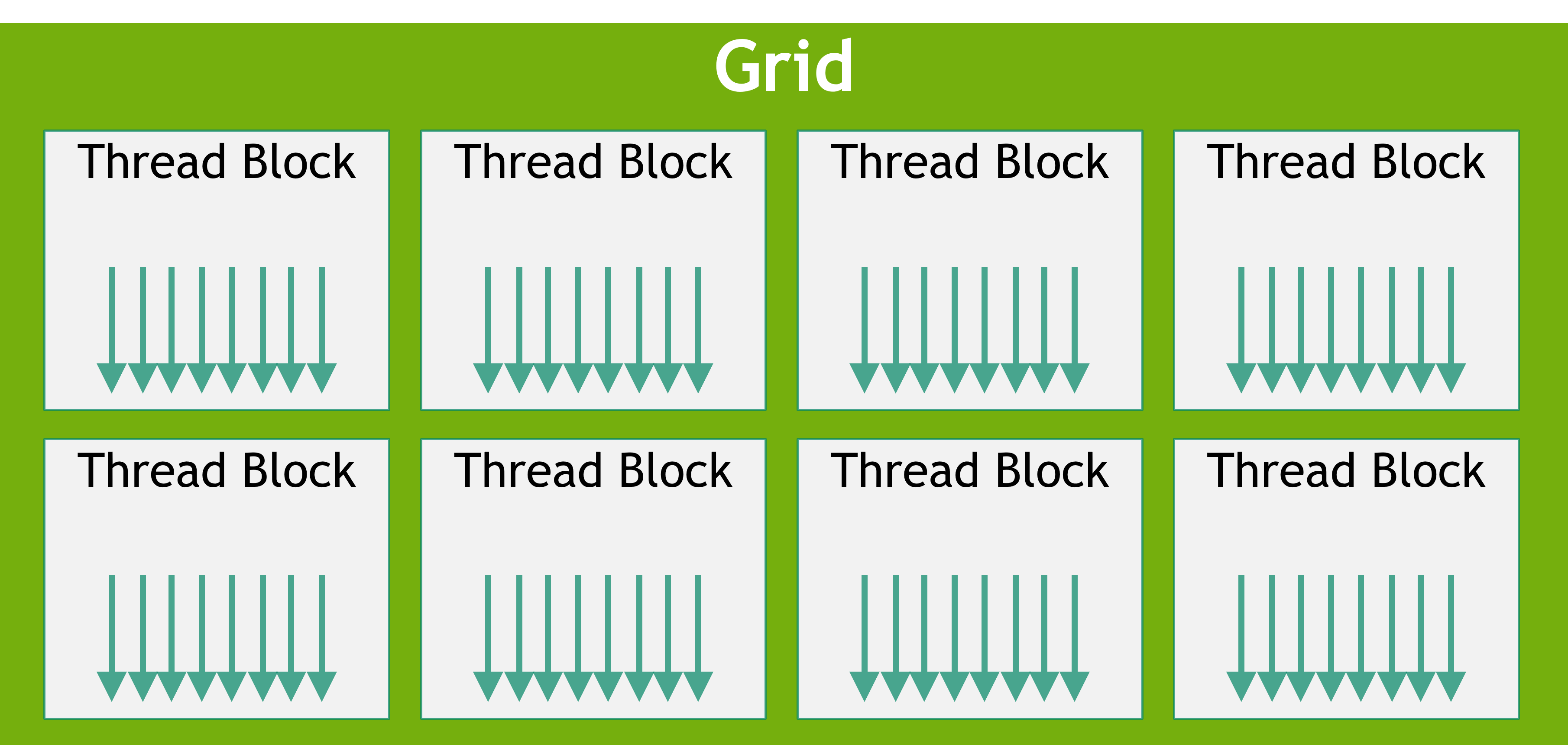
不过,一个内核可以由多个形状相同的线程块执行,因此线程总数等于每个线程块的线程数乘以线程块的数量。
块被组织成一维、二维或三维的线程块网格 (grid),如下图 grid-of-thread-blocks 所示。网格中的线程块数量通常由待处理数据的大小决定,而数据规模通常超过系统中处理器的数量。
Note
<<<…>>>语法中所指定的每个 block 的线程数和每个 grid 的 block 数的类型为int或dim3类型。如上例所示,可以指定二维块或网格。
grid 内的每个 block 都可通过一维、二维或三维唯一索引进行标识,在内核中可通过内置变量 blockIdx 访问该索引。block 的维度在内核中可通过内置变量 blockDim 访问。
blockIdx(线程 block 在线程 grid 内的位置索引)threadIdx(线程在线程 block 内的位置索引)
将之前的 MatAdd() 示例扩展为处理多个线程块后,代码如下:
// Kernel definition
__global__ void MatAdd(float A[N][N], float B[N][N],
float C[N][N])
{
    int i = blockIdx.x * blockDim.x + threadIdx.x;
    int j = blockIdx.y * blockDim.y + threadIdx.y;
    if (i < N && j < N)
        C[i][j] = A[i][j] + B[i][j];
}

int main()
{
    ...
    // Kernel invocation
    dim3 threadsPerBlock(16, 16);
    dim3 numBlocks(N / threadsPerBlock.x, N / threadsPerBlock.y);
    MatAdd<<<numBlocks, threadsPerBlock>>>(A, B, C);
    ...
}
16×16(256 个线程)的线程块大小尽管在此例中是任意选择的,但属于常见做法。网格的创建需包含足够的线程块,以保证像之前一样每个矩阵元素对应一个线程。为简化起见,此示例假设网格在各维度的线程数能被对应维度上线程块的线程数整除,但实际并非必须满足这一条件。
线程块必须独立执行。线程块的执行顺序可以是任意的,既可以并行执行,也可以串行执行。这种独立性要求使得线程块能够按任意顺序调度到任意数量的核心上(如图 automatic-scalability 所示),从而让程序员能够编写可随核心数量扩展的代码。

块内线程可通过共享内存共享数据,并通过同步执行来协调内存访问,以此实现协作。更具体地说,可通过调用内置函数 __syncthreads () 在内核中指定同步点;__syncthreads () 作为一个屏障,块内所有线程必须在此处等待,之后才能继续执行。Shared Memory 部分给出了共享内存的使用示例。除 __syncthreads () 外,Cooperative Groups API 还提供了一系列丰富的线程同步原语。
为实现高效协作,共享内存应是靠近各处理器核心的低延迟内存(类似 L 1 缓存),而 __syncthreads () 也应具备轻量特性。
线程块集群
随着 NVIDIA Compute Capability 9.0 的推出,CUDA 编程模型引入了一个可选的层次结构级别,称为线程块集群,它由线程块组成。就像线程块中的线程能保证在流多处理器上协同调度一样,集群中的线程块也能保证在 GPU 的 GPU 处理集群(GPC)上协同调度。与线程块类似,集群也被组织成一维、二维或三维的线程块集群网格,如 grid-of-clusters 所示。集群中的线程块数量可以由用户定义,在 CUDA 中,作为可移植的集群大小,一个集群最多支持 8 个线程块。请注意,在过小而无法支持 8 个多处理器的 GPU 硬件或 MIG 配置上,最大集群大小将相应减小。识别这些较小的配置,以及支持超过 8 个线程块集群大小的较大配置,是特定于架构的,可以使用 cudaOccupancyMaxPotentialClusterSize API 进行查询。
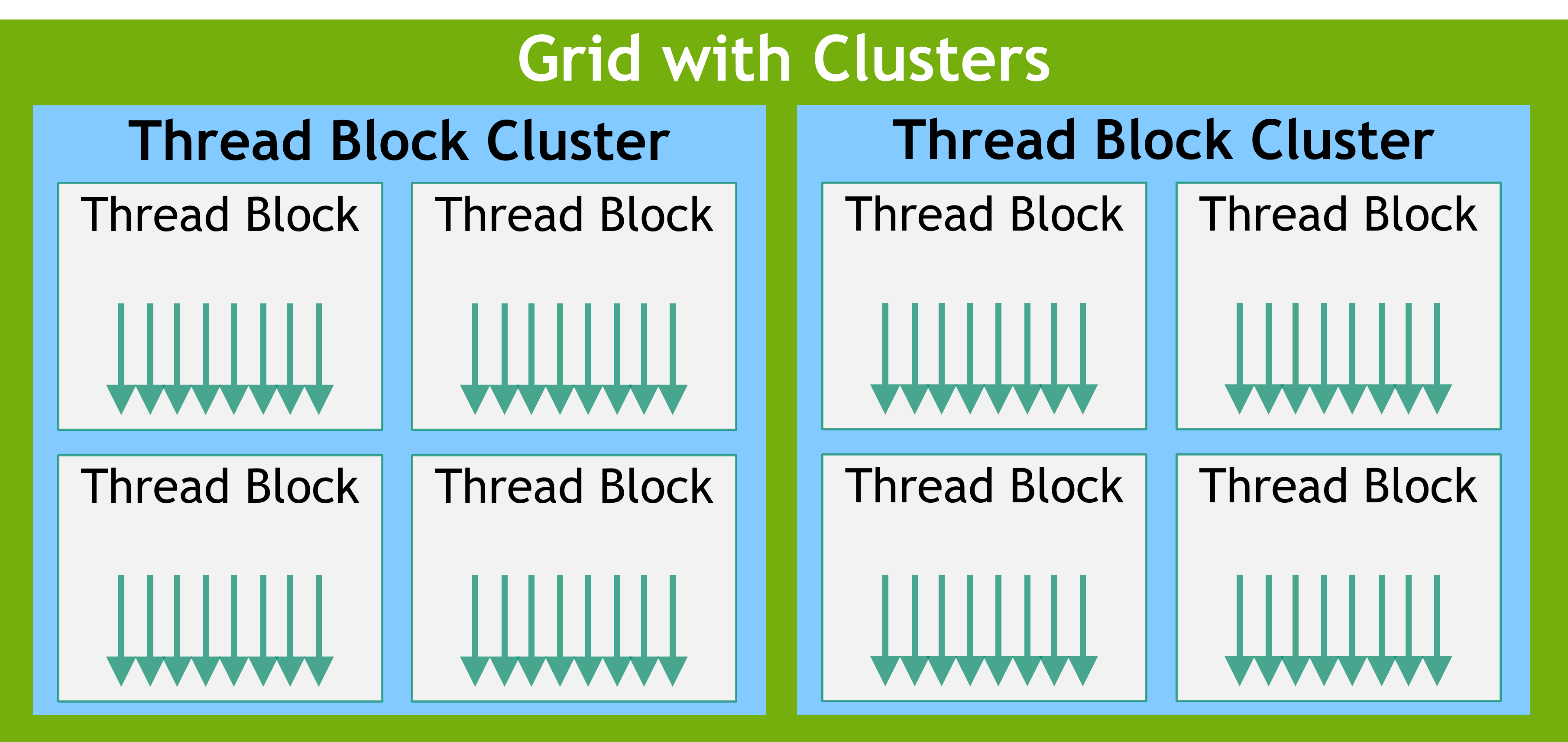
出于兼容性考虑,在使用集群支持启动的内核中,gridDim 变量仍然表示线程块数量的大小。可以使用 Cluster Group API 来获取集群中 block 的 rank。
可以通过以下两种方式在核函数中启用线程块集群:使用编译期核函数属性 __cluster_dims__(X, Y, Z),或者使用 CUDA 核函数启动 API cudaLaunchKernelEx。
下面的示例展示了如何使用编译期核函数属性来启动一个集群。使用核函数属性的集群大小在编译期就已固定,随后可以使用经典的 <<< , >>> 来启动核函数。如果一个核函数使用编译期集群大小,那么在启动核函数时无法修改该集群大小。
// Kernel definition
// Compile time cluster size 2 in X-dimension and 1 in Y and Z dimension
__global__ void __cluster_dims__(2, 1, 1) cluster_kernel(float *input, float* output)
{

}

int main()
{
    float *input, *output;
    // Kernel invocation with compile time cluster size
    dim3 threadsPerBlock(16, 16);
    dim3 numBlocks(N / threadsPerBlock.x, N / threadsPerBlock.y);

    // The grid dimension is not affected by cluster launch, and is still enumerated
    // using number of blocks.
    // The grid dimension must be a multiple of cluster size.
    cluster_kernel<<<numBlocks, threadsPerBlock>>>(input, output);
}
线程块集群大小也可以在运行时设置,并且可以使用 CUDA 内核启动 API cudaLaunchKernelEx 来启动内核。下面的代码示例展示了如何使用可扩展 API 启动集群内核。
// Kernel definition
// No compile time attribute attached to the kernel
__global__ void cluster_kernel(float *input, float* output)
{

}

int main()
{
    float *input, *output;
    dim3 threadsPerBlock(16, 16);
    dim3 numBlocks(N / threadsPerBlock.x, N / threadsPerBlock.y);

    // Kernel invocation with runtime cluster size
    {
        cudaLaunchConfig_t config = {0};
        // The grid dimension is not affected by cluster launch, and is still enumerated
        // using number of blocks.
        // The grid dimension should be a multiple of cluster size.
        config.gridDim = numBlocks;
        config.blockDim = threadsPerBlock;

        cudaLaunchAttribute attribute[1];
        attribute[0].id = cudaLaunchAttributeClusterDimension;
        attribute[0].val.clusterDim.x = 2; // Cluster size in X-dimension
        attribute[0].val.clusterDim.y = 1;
        attribute[0].val.clusterDim.z = 1;
        config.attrs = attribute;
        config.numAttrs = 1;

        cudaLaunchKernelEx(&config, cluster_kernel, input, output);
    }
}
在计算能力为 9.0 的 GPU 中,集群中的所有线程块都能保证在单个 GPU 处理集群(GPC)上协同调度,并允许集群中的线程块使用 Cluster Group API cluster.sync() 执行硬件支持的同步操作。集群组还提供成员函数,分别使用 num_threads () 和 num_blocks () API,依据线程数量或块数量来查询集群组的大小。分别使用 dim_threads () 和 dim_blocks () API,可以查询集群组中一个线程或块的 rank。属于某个集群的线程块可以访问分布式共享内存。集群中的线程块能够对分布式共享内存中的任何地址执行读取、写入和原子操作。Distributed Shared Memory 给出了一个在分布式共享内存中执行直方图计算的示例。
异构编程模型
CUDA 编程模型是一个异构模型,需要 CPU 和 GPU 协同工作。在 CUDA 中,host和device是两个重要的概念,我们用 host 指代 CPU 及其内存,而用 device 指代 GPU 及其内存。CUDA 程序中既包含 host 程序,又包含 device 程序,它们分别在 CPU 和 GPU 上运行。同时,host 与 device 之间可以进行通信,这样它们之间可以进行数据拷贝。典型的 CUDA 程序的执行流程如下:
- 分配 host 内存,并进行数据初始化;
- 分配 device 内存,并从 host 将数据拷贝到 device 上;
- 调用 CUDA 的核函数在 device 上完成指定的运算;
- 将 device 上的运算结果拷贝到 host 上;
- 释放 device 和 host 上分配的内存。
如下图所示,CUDA 编程模型假定 CUDA 线程在物理独立的设备 (device) 上执行,该设备作为运行 C++ 程序的主机 (host) 的协处理器运行。例如,当内核在 GPU 上执行而 C++ 程序的其余部分在 CPU 上执行时,就是这种情况。
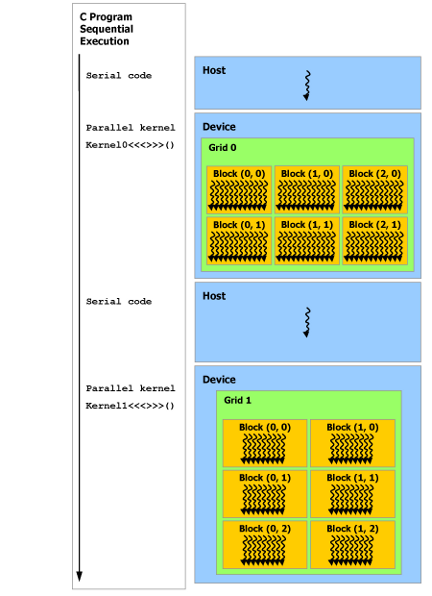
CUDA 编程模型还假设主机 (host) 和设备 (device) 都在 DRAM 中维护自己独立的内存空间,分别称为主机内存 (host memory) 和设备内存 (device memory)。因此,需要程序通过调用 CUDA 运行时(在 Programming Interface 中描述)来管理内核可见的全局、常量和纹理内存空间。这包括设备内存分配和释放以及主机和设备内存之间的数据传输。
统一内存提供托管内存 (managed memory) 来桥接主机和设备内存空间。托管内存可以被系统中的所有 CPU 和 GPU 访问,作为具有公共地址空间,构建一个单一的、连贯的内存映像。此功能可实现对设备内存的超额订阅 (oversubscription),并且无需在主机和设备上显式镜像数据,从而大大简化了移植应用程序的任务。有关统一内存的介绍,请参阅统一 Unified Memory Programming。
异构编程模型
串行代码在主机 (
host) 上执行,并行代码在设备 (device) 上执行。
由于 GPU 实际上是异构模型,所以需要区分 host 和 device 上的代码,在 CUDA 中是通过函数类型限定词开区别 host 和 device 上的函数,主要的三个函数类型限定词如下:
在 C 语言函数前没有的限定符global , CUDA C 中还有一些其他我们在 C 中没有的限定符,如下:
| 限定符 | 执行 | 调用 | 备注 |
|---|---|---|---|
| global | device 执行 | 可以从 host 调用也可以从计算能力 3 以上的设备调用 | 返回类型必须是 void,不支持可变参数参数,不能成为类成员函数。 |
| device | device 执行 | 单仅可以从 device 中调用,不可以和 __global__ 同时用。 | |
| host | host 执行 | 仅可以从 host 上调用,不可以和 __global__ 同时用,但可和 __device__,此时函数会在 device 和 host 都编译。 | 一般省略不写 |
注意用 __global__ 定义的 kernel 是异步的,这意味着 host 不会等待 kernel 执行完就执行下一步。
而且这里有个特殊的情况就是有些函数可以同时定义为 device 和 host ,这种函数可以同时被设备和主机端的代码调用,主机端代码调用函数很正常,设备端调用函数与 C 语言一致,但是要声明成设备端代码,告诉 nvcc 编译成设备机器码,同时声明主机端设备端函数,那么就要告诉编译器,生成两份不同设备的机器码。
Kernel 核函数编写有以下限制
- 只能访问设备内存
- 必须有 void 返回类型
- 不支持可变数量的参数
- 不支持静态变量
- 显示异步行为
并行程序中经常的一种现象:把串行代码并行化时对串行代码块 for 的操作,也就是把 for 并行化。
异步 SIMT 编程模型
在 CUDA 编程模型中,线程是进行计算或内存操作的最低级别的抽象。从基于 NVIDIA Ampere GPU 架构的设备开始,CUDA 编程模型通过异步编程模型为访存操作提供加速。异步编程模型定义了与 CUDA 线程相关的异步操作的行为。
异步编程模型为 CUDA 线程之间的同步定义了 Asynchronous Barrier 的行为。该模型还解释并定义了如何使用 cuda::memcpy_async 在 GPU 计算时从全局内存中异步移动数据。
异步操作
异步操作定义为一种由 CUDA 线程发起的操作,并且与其他线程一样异步执行。在结构良好的程序中,一个或多个 CUDA 线程可与异步操作同步。发起异步操作的 CUDA 线程不需要在同步线程中。
这样的异步线程(as-if 线程)总是与发起异步操作的 CUDA 线程相关联。异步操作使用同步对象来同步操作的完成。这样的同步对象可以由用户显式管理(例如,cuda::memcpy_async)或在库中隐式管理(例如,cooperative_groups::memcpy_async)。
同步对象可以是 cuda::barrier 或 cuda::pipeline。这些对象在 Asynchronous Barrier 和 Asynchronous Data Copies using cuda::pipeline 中进行了详细说明。这些同步对象可以在不同的线程范围内使用。作用域定义了一组线程,这些线程可以使用同步对象与异步操作进行同步。下表定义了 CUDA C++ 中可用的线程作用域,以及可以与每个线程同步的线程。
| Thread Scope | Description |
|---|---|
| cuda::thread_scope::thread_scope_thread | Only the CUDA thread which initiated asynchronous operations synchronizes. |
| cuda::thread_scope::thread_scope_block | All or any CUDA threads within the same thread block as the initiating thread synchronizes. |
| cuda::thread_scope::thread_scope_device | All or any CUDA threads in the same GPU device as the initiating thread synchronizes. |
| cuda::thread_scope::thread_scope_system | All or any CUDA or CPU threads in the same system as the initiating thread synchronizes. |
这些线程作用域是在 CUDA Standard C++ 中作为标准 C++ 的扩展来实现的。
CUDA Execution Model
The goal of learing execution model from the hardware perspective:
- Developing kernels with a profile-driven approach
- Understanding the nature of warp execution
- Exposing more parallelism to the GPU
- Mastering grid and block configuration heuristics
- Learning various CUDA performance metrics and events
- Probing dynamic parallelism and nested execution
In general, an execution model provides an operational view of how instructions are executed on a specific computing architecture. The CUDA execution model exposes an abstract view of the GPU parallel architecture, allowing you to reason about thread concurrency. The CUDA execution model provides insights that are useful for writing efficient code in terms of both instruction throughput and memory accesses.
GPU Architecture Overview
The GPU architecture is built around a scalable array of Streaming Multiprocessors (SM). GPU hardware parallelism is achieved through the replication of this architectural building block. Figure 3-1 illustrates the key components of a Fermi SM:
- CUDA Cores
- Shared Memory/L1 Cache
- Register File
- Load/Store Units
- Special Function Units
- Warp Scheduler
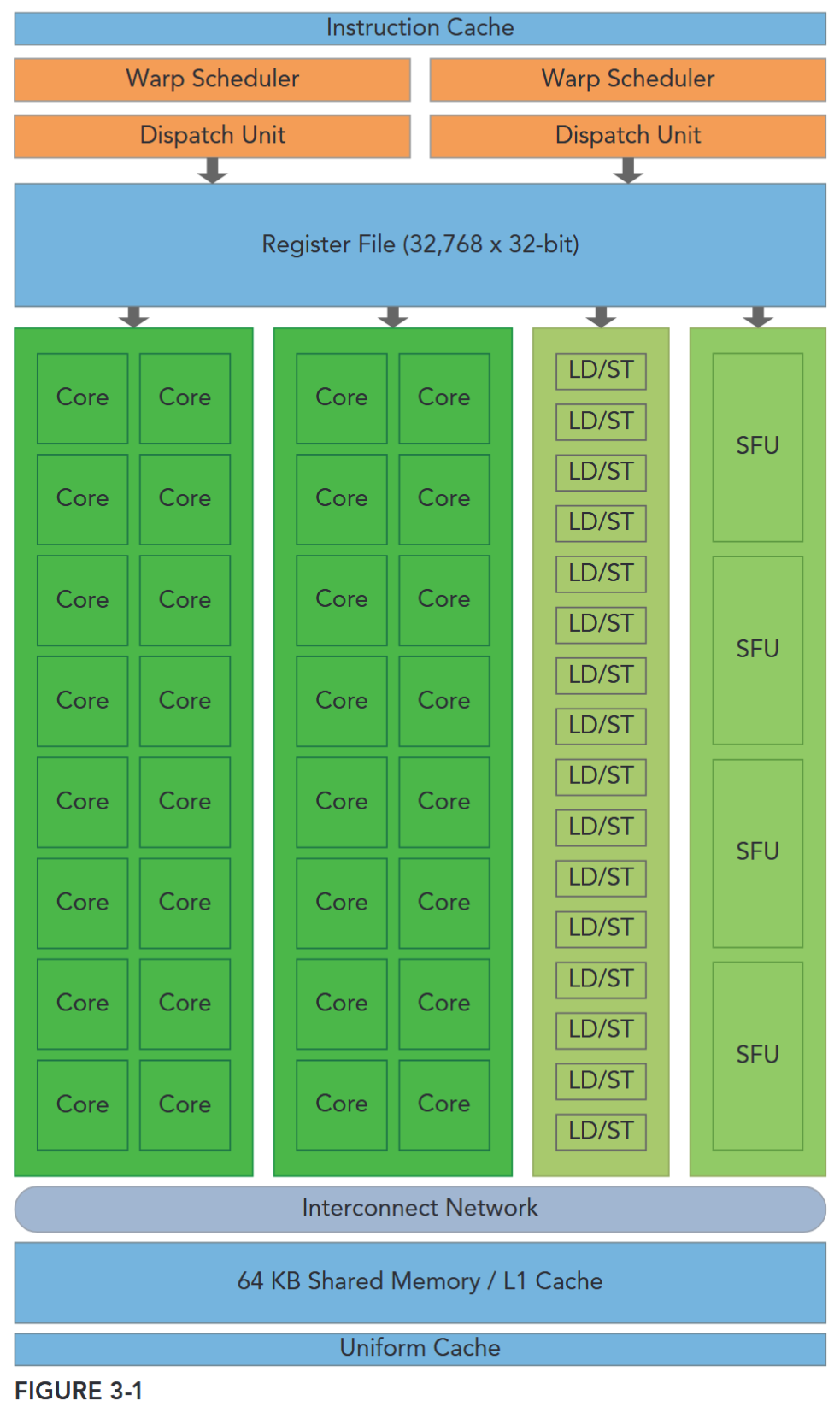
Each SM in a GPU is designed to support concurrent execution of hundreds of threads, and there are generally multiple SMs per GPU, so it is possible to have thousands of threads executing concurrently on a single GPU. When a kernel grid is launched, the thread blocks of that kernel grid are distributed among available SMs for execution. Once scheduled on an SM, the threads of a thread block execute concurrently only on that assigned SM. Multiple thread blocks may be assigned to the same SM at once and are scheduled based on the availability of SM resources. Instructions within a single thread are pipelined to leverage instruction-level parallelism, in addition to the thread-level parallelism you are already familiar with in CUDA.
并行性
- 线程级并行(Thread-Level Parallelism): “多 SM + 多线程块 + 多线程” 的并发 —— 一个 block 只能在一个 SM 上,一个 SM 可以分配多个 block;
- 指令级并行(Instruction-Level Parallelism):针对单个线程,GPU 会将其指令按流水线方式执行(比如 “取指 - 译码 - 执行 - 写回” 等步骤重叠),进一步提升单个线程的执行效率,补充线程级并行的性能。
CUDA employs a Single Instruction Multiple Thread (SIMT) architecture to manage and execute threads in groups of 32 called warps. All threads in a warp execute the same instruction at the same time. Each thread has its own instruction address counter and register state, and carries out the current instruction on its own data. Each SM partitions the thread blocks assigned to it into 32-thread warps that it then schedules for execution on available hardware resources.
SIMT: block 被划分为 warp 调度
CUDA 的SIMT(单指令多线程)架构及其与 SIMD(单指令多数据)的差异,可拆解为:
- 线程分组:Warp(线程束)
- CUDA 将线程按32 个为一组划分为“Warp”,这是线程调度和执行的基本单位。同一 Warp 内的所有线程同时执行相同指令(体现“单指令”),但每个线程拥有独立的“指令地址计数器”和“寄存器状态”,仅对自身数据进行运算(体现“多线程”的独立性)。
- SM 的角色
- GPU 的核心计算单元“SM(流多处理器)”会先将分配给它的“线程块(Thread Block)”拆分为 32 线程 Warp,再根据硬件资源空闲情况调度这些 Warp 执行。
- SIMT 与 SIMD 的核心共性与差异
- 二者本质都是通过“广播同一指令到多个执行单元”实现并行,但关键区别在于执行单元的同步性与独立性:
| 维度 | SIMD(单指令多数据) | SIMT(单指令多线程) |
|---|---|---|
| 执行单元约束 | 要求“向量中的所有元素”在统一同步组内执行,无法独立行为 | 允许同一 Warp 内的线程独立执行(即使起始指令地址相同) |
| 编程灵活性 | 更侧重“数据级并行”,需显式处理向量数据 | 同时支持“线程级并行”(独立标量线程)和“数据级并行”(协同线程) |
SIMT 的独特价值:SIMT 相比 SIMD,能让开发者更灵活地编写并行代码:无需像 SIMD 那样严格控制“向量数据的同步性”,可直接按“独立线程”逻辑编程(每个线程处理一个任务/数据),同时也能通过 Warp 的协同性实现数据并行——既简化了并行代码编写,又保留了线程独立处理特殊逻辑(如分支)的能力。
The SIMT architecture is similar to the SIMD (Single Instruction, Multiple Data) architecture. Both SIMD and SIMT implement parallelism by broadcasting the same instruction to multiple execution units. A key difference is that SIMD requires that all vector elements in a vector execute together in a unified synchronous group, whereas SIMT allows multiple threads in the same warp to execute independently. Even though all threads in a warp start together at the same program address, it is possible for individual threads to have different behavior. SIMT enables you to write thread-level parallel code for independent, scalar threads, as well as data-parallel code for coordinated threads. The SIMT model includes three key features that SIMD does not:
- Each thread has its own instruction address counter.
- Each thread has its own register state.
- Each thread can have an independent execution path.
A MAGIC NUMBER: 32
The number 32 is a magic number in CUDA programming. It comes from hardware, and has a significant impact on the performance of software. Conceptually, you can think of it as the granularity of work processed simultaneously in SIMD fashion by an SM. Optimizing your workloads to fit within the boundaries of a warp (group of 32 threads) will generally lead to more efficient utilization of GPU compute resources.
SM
A thread block is scheduled on only one SM. Once a thread block is scheduled on an SM, it remains there until execution completes. An SM can hold more than one thread block at the same time.
Figure 3-2 illustrates the corresponding components from the logical view and hardware view of CUDA programming.
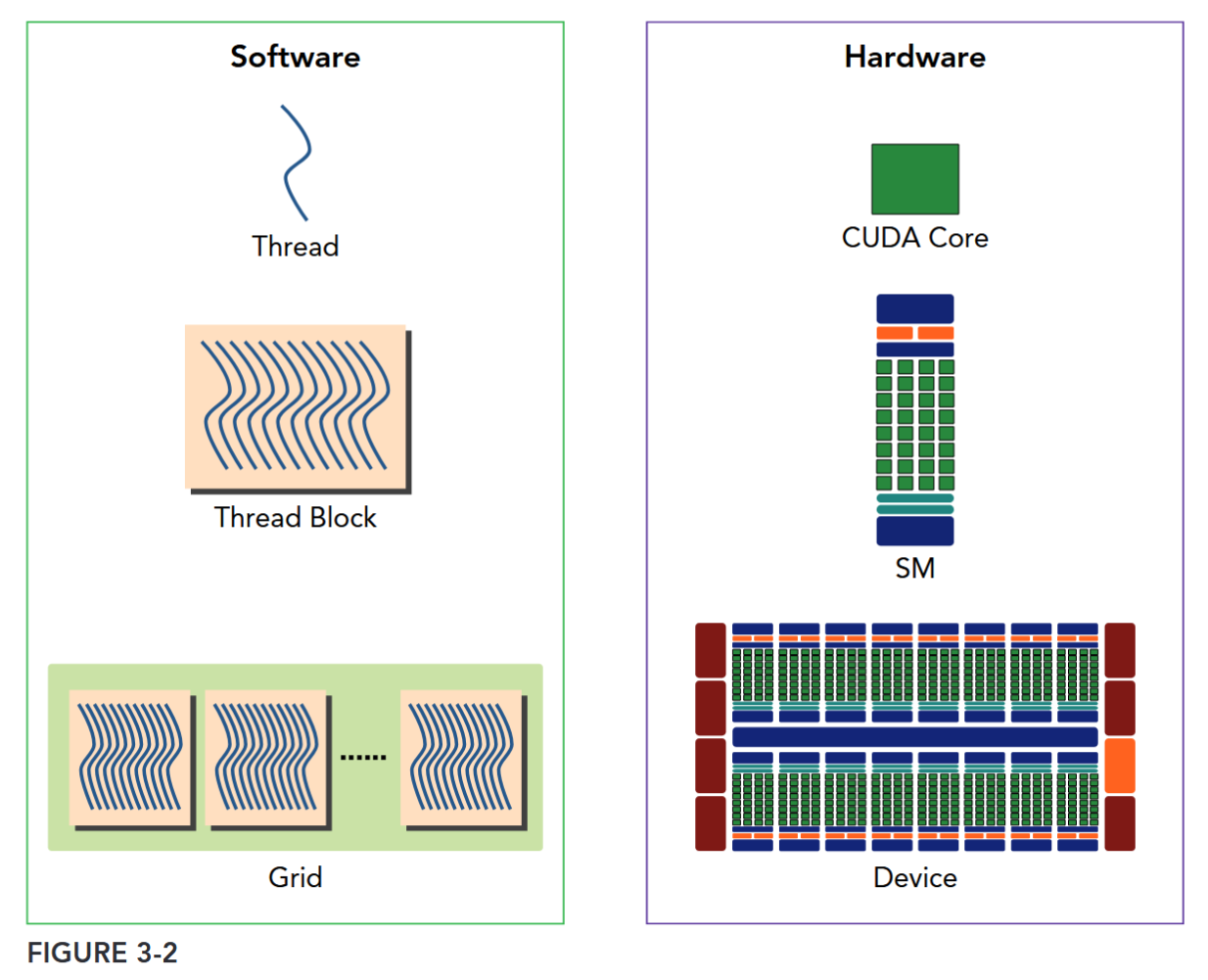
Shared memory and registers are precious resources in an SM. Shared memory is partitioned among thread blocks resident on the SM and registers are partitioned among threads. Threads in a thread block can cooperate and communicate with each other through these resources. While all threads in a thread block run logically in parallel, not all threads can execute physically at the same time. As a result, different threads in a thread block may make progress at a different pace.
Sharing data among parallel threads may cause a race condition: Multiple threads accessing the same data with an undefined ordering, which results in unpredictable program behavior. CUDA provides a means to synchronize threads within a thread block to ensure that all threads reach certain points in execution before making further progress. However, no primitives are provided for inter-block synchronization.
CUDA provides a means to synchronize threads within a block but no primitives to inter-block synchronization.
While warps within a thread block may be scheduled in any order, the number of active warps is limited by SM resources. When a warp idles for any reason (for example, waiting for values to be read from device memory), the SM is free to schedule another available warp from any thread block that is resident on the same SM. Switching between concurrent warps has no overhead because hardware resources are partitioned among all threads and blocks on an SM, so the state of the newly scheduled warp is already stored on the SM.
SM: THE HEART OF THE GPU ARCHITECTURE
The Streaming Multiprocessor (SM) is the heart of the GPU architecture. Registers and shared memory are scarce resources in the SM. CUDA partitions these resources among all threads resident on an SM. Therefore, these limited resources impose a strict restriction on the number of active warps in an SM, which corresponds to the amount of parallelism possible in an SM. Knowing some basic facts about the hardware components of an SM will help you organize threads and configure kernel execution to get the best performance.
SM 上 active warp 是有限的,而 warp 可以无开销地灵活调度
Case Study: Fermi and Kepler
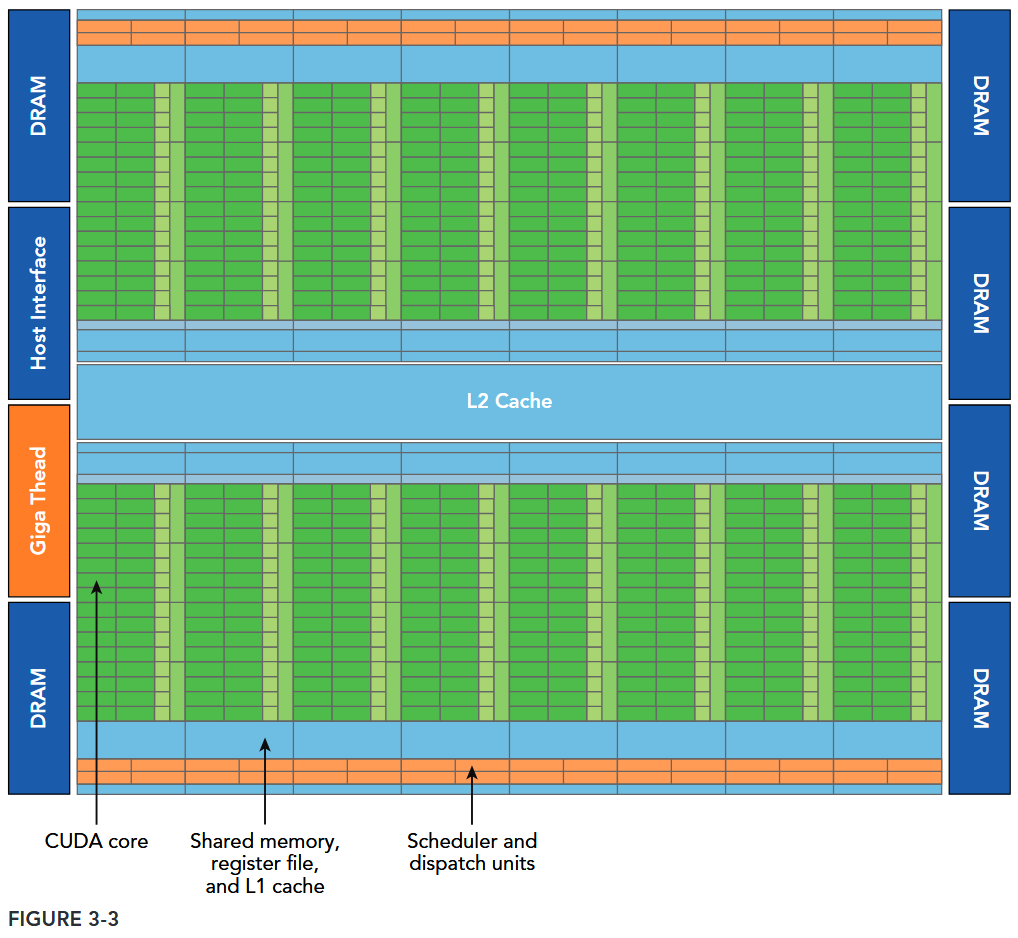
Figure 3-3 illustrates a logical block diagram of the Fermi architecture focused on GPU computing with graphics-specific components largely omitted.
- Fermi features up to 512 accelerator cores, called CUDA cores. Each CUDA core has a fully pipelined integer arithmetic logic unit (ALU) and a floating-point unit (FPU) that executes one integer or floating-point instruction per clock cycle.
- The CUDA cores are organized into 16 streaming multiprocessors (SM), each with 32 CUDA cores.
- Fermi has six 384-bit GDDR5 DRAM memory interfaces supporting up to a total of 6 GB of global on-board memory, a key compute resource for many applications.
- A host interface connects the GPU to the CPU via the PCI Express bus.
- The GigaThread engine (shown in orange on the left side of the diagram) is a global scheduler that distributes thread blocks to the SM warp schedulers.
- Fermi includes a coherent 768 KB L2 cache, shared by all 16 SMs.
- Each SM in Figure 3-3 is represented by a vertical rectangular strip containing:
- Execution units (CUDA cores)
- Scheduler and dispatcher units that schedule warps
- Shared memory, the register file, and L1 cache
- Each multiprocessor has 16 load/store units (shown in Figure 3-1), allowing source and destination addresses to be calculated for 16 threads (a half-warp) per clock cycle.
- Special function units (SFUs) execute intrinsic instructions such as sine, cosine, square root, and interpolation. Each SFU can execute one intrinsic instruction per thread per clock cycle.
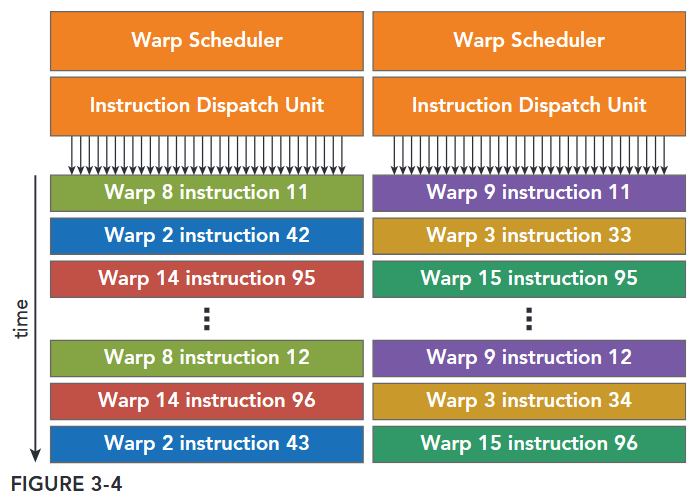
- Each SM features two warp schedulers and two instruction dispatch units. When a thread block is assigned to an SM, all threads in a thread block are divided into warps. The two warp schedulers select two warps and issue one instruction from each warp to a group of 16 CUDA cores, 16 load/store units, or 4 special function units (illustrated in Figure 3-4).
The Fermi architecture, compute capability 2.x, can simultaneously handle 48 warps per SM for a total of 1,536 threads resident in a single SM at a time.
One key feature of Fermi is the 64 KB on-chip configurable memory, which is partitioned between shared memory and L1 cache. Shared memory allows threads within a block to cooperate, facilitates extensive reuse of on-chip data, and greatly reduces off-chip traffic.
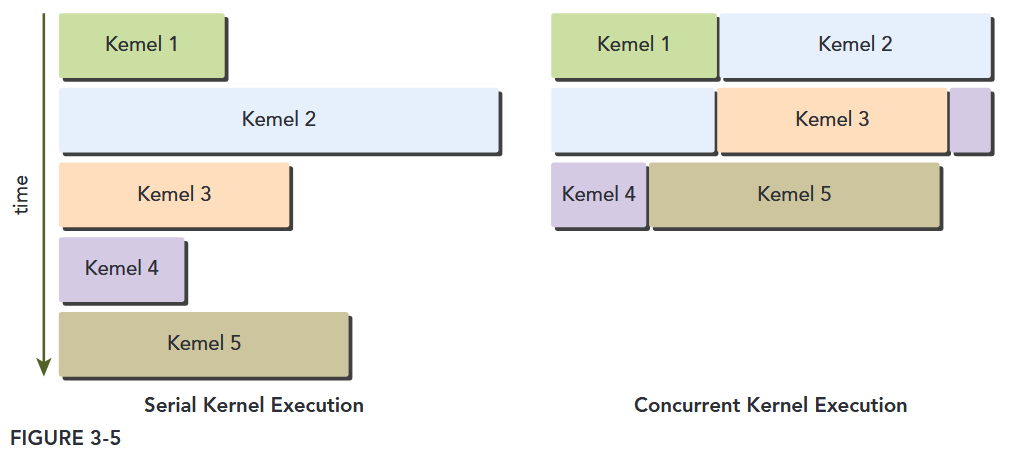
Fermi also supports concurrent kernel execution: multiple kernels launched from the same application context executing on the same GPU at the same time. Concurrent kernel execution allows programs that execute a number of small kernels to fully utilize the GPU, as illustrated in Figure 3-5. Fermi allows up to 16 kernels to be run on the device at the same time. Concurrent kernel execution makes the GPU appear more like a MIMD architecture from the programmer’s perspective.
UNDERSTANDING THE NATURE OF WARP EXECUTION
Warps are the basic unit of execution in an SM. When you launch a grid of thread blocks, the thread blocks in the grid are distributed among SMs. Once a thread block is scheduled to an SM, threads in the thread block are further partitioned into warps. A warp consists of 32 consecutive threads and all threads in a warp are executed in Single Instruction Multiple Thread (SIMT) fashion; that is, all threads execute the same instruction, and each thread carries out that operation on its own private data. Figure 3-10 illustrates the relationship between the logical view and hardware view of a thread block.
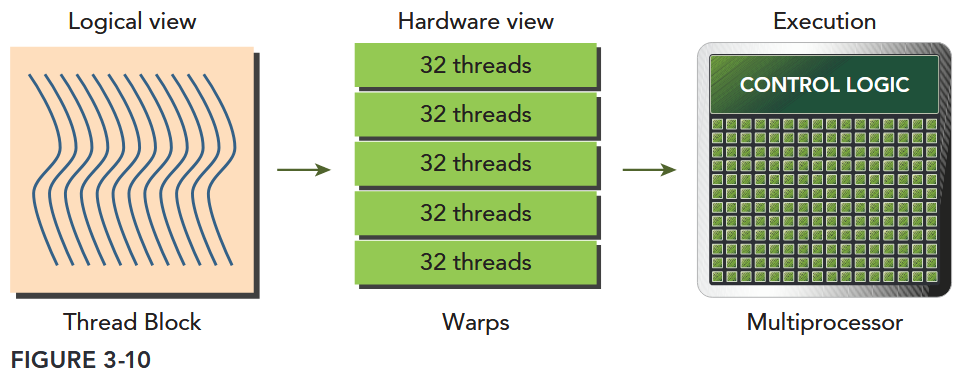
Thread blocks can be configured to be one-, two-, or three-dimensional. However, from the hardware perspective, all threads are arranged one-dimensionally. Each thread has a unique ID in a block. For a one-dimensional thread block, the unique thread ID is stored in the CUDA built-in variable threadIdx.x, and threads with consecutive values for threadIdx.x are grouped into warps. For example, a one-dimensional thread block with 128 threads will be organized into 4 warps as follows:
Warp 0: thread 0, thread 1, thread 2, ... thread 31
Warp 1: thread 32, thread 33, thread 34, ... thread 63
Warp 3: thread 64, thread 65, thread 66, ... thread 95
Warp 4: thread 96, thread 97, thread 98, ... thread 127
The logical layout of a two or three-dimensional thread block can be converted into its one-dimensional physical layout by using the x dimension as the innermost dimension, the y dimension as the second dimension, and the z dimension as the outermost. For example, given a 2D thread block, a unique identifier for each thread in a block can be calculated using the built-in threadIdx and blockDim variables: threadIdx.y * blockDim.x + threadIdx.x. The same calculation for a 3D thread block is as follows: threadIdx.z * blockDim.y * blockDim.x + threadIdx.y * blockDim.x + threadIdx.x The number of warps for a thread block can be determined as follows:
Thus, the hardware always allocates a discrete number of warps for a thread block. A warp is never split between different thread blocks. If thread block size is not an even multiple of warp size, some threads in the last warp are left inactive. Even though these threads are unused they still consume SM resources, such as registers.
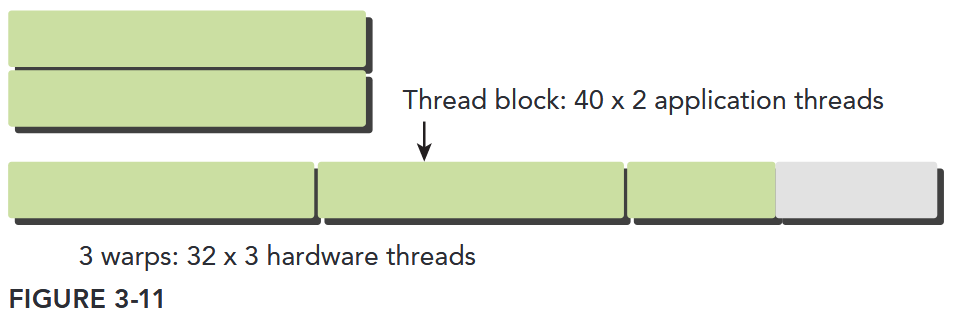
这里消耗的寄存器并非函数的参数寄存器(args register),而是线程执行时分配的“本地通用寄存器”,且核心与“线程块(block)级资源预分配”机制相关。
在 CUDA 架构中,寄存器是 SM 上的高速片上存储,主要分为两类,需先区分:
| 寄存器类型 | 用途 | 分配方式 | 与“未使用线程消耗资源”的关联 |
|---|---|---|---|
| 参数寄存器 | 仅用于传递核函数的参数(如 __global__ void kernel(int a, float b) 中的 a 和 b) | 核函数启动时统一分配,全局共享(所有线程共享同一批参数寄存器,无需为每个线程单独分配) | 无关联:参数寄存器不按线程分配,未使用线程不会额外消耗它 |
| 本地通用寄存器 | 用于存储线程的本地变量(如核函数内定义的 int temp、float arr[10])、中间计算结果 | 按线程块(block)预分配,每个线程会分配固定数量的通用寄存器 | 强关联:这是“未使用线程消耗的核心寄存器资源” |
CUDA 的 SM 在调度线程时,不按单个线程分配资源,而是按“线程块(block)”为单位预分配资源,核心逻辑如下:
- 编译期确定“单线程寄存器需求”:CUDA 编译器(nvcc)会根据核函数的代码逻辑(如本地变量数量、计算复杂度),分析出每个线程执行该核函数所需的最小通用寄存器数量(可通过
nvcc --ptxas-options=-v查看,如ptxas info : Used 24 registers, 32 bytes smem)。 - 运行期按 block 预分配资源:当核函数启动时(如
kernel<<<gridDim, blockDim>>>(...)),SM 会根据“单线程寄存器需求” × “block 内线程数(blockDim)”,计算出每个 block 需要的总寄存器数量,并为该 block预分配全部寄存器(无论线程是否实际执行有用逻辑)。 - 线程绑定寄存器,未使用也不释放:每个线程在 block 内会被分配固定数量的通用寄存器(编译期确定的数量),即使线程因分支(如
if (threadIdx.x % 2 == 0) { ... })进入“未执行有用代码”的分支,其绑定的寄存器也不会被回收——因为 SM 的资源调度是“block 级预分配 + 线程级绑定”,一旦分配就不会动态调整。
Warp Divergence
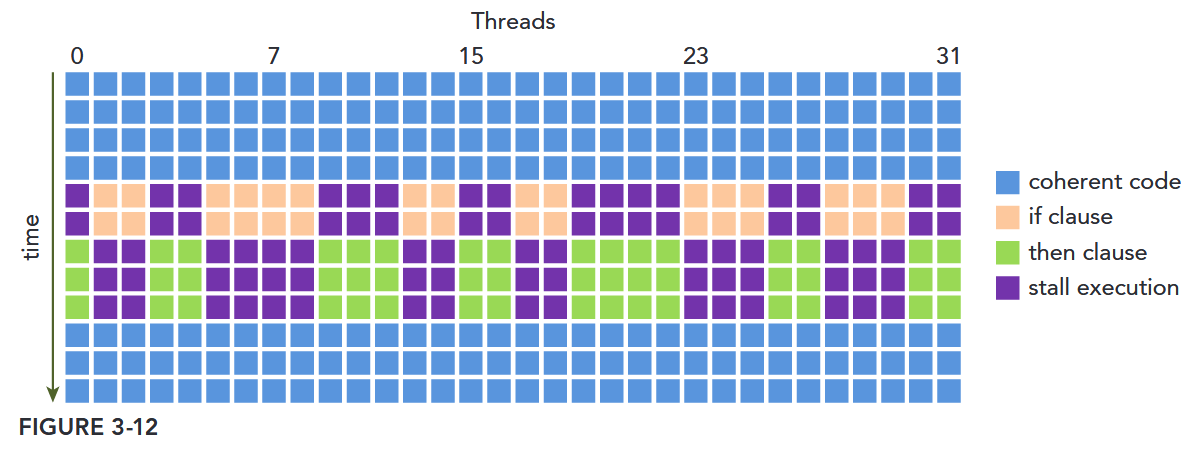
Threads in the same warp executing different instructions is referred to as warp divergence.
If threads of a warp diverge, the warp serially executes each branch path, disabling threads that do not take that path. Warp divergence can cause significantly degraded performance.
Resource Partitioning
The local execution context of a warp mainly consists of the following resources:
- Program counters
- Registers
- Shared memory
The execution context of each warp processed by an SM is maintained on-chip during the entire lifetime of the warp. Therefore, switching from one execution context to another has no cost.
Each SM has a set of 32-bit registers stored in a register file that are partitioned among threads, and a fixed amount of shared memory that is partitioned among thread blocks. The number of thread blocks and warps that can simultaneously reside on an SM for a given kernel depends on the number of registers and amount of shared memory available on the SM and required by the kernel.
Resource availability generally limits the number of resident thread blocks per SM. The number of registers and the amount of shared memory per SM vary for devices of different compute capability. If there are insufficient registers or shared memory on each SM to process at least one block, the kernel launch will fail.
显卡的计算能力决定了并行能力
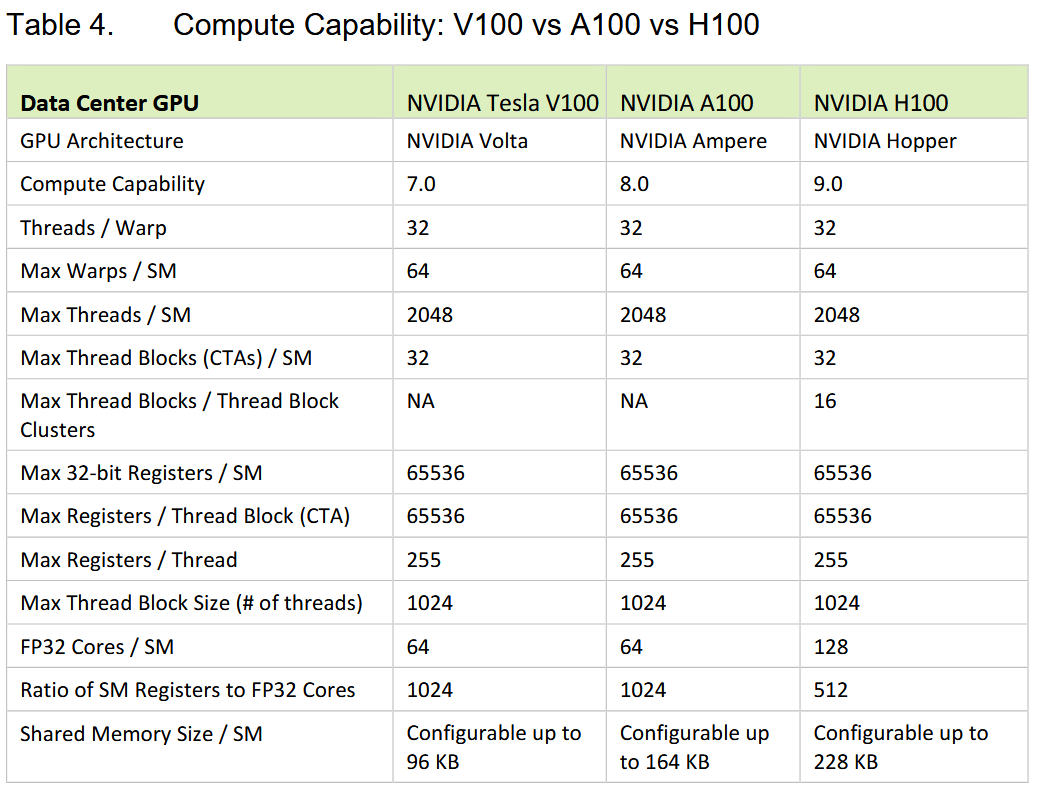
A thread block is called an active block when compute resources, such as registers and shared memory, have been allocated to it. The warps it contains are called active warps. Active warps can be further classified into the following three types:
- Selected warp
- Stalled warp
- Eligible warp
The warp schedulers on an SM select active warps on every cycle and dispatch them to execution units. A warp that is actively executing is called a selected warp. If an active warp is ready for execution but not currently executing, it is an eligible warp. If a warp is not ready for execution, it is a stalled warp. A warp is eligible for execution if both of the following two conditions is met:
- Thirty-two CUDA cores are available for execution.
- All arguments to the current instruction are ready.
| 类型(Type) | 核心状态描述 | 关键逻辑 |
|---|---|---|
| 选中 warp(Selected Warp) | 正在执行 | 被 warp 调度器选中,已分派到 CUDA 核心等执行单元,是当前“正在干活”的 warp |
| 合格 warp(Eligible Warp) | 就绪但未执行 | 满足两个执行条件(32 个 CUDA 核心空闲 + 当前指令的所有参数就绪),等待被调度 |
| 停滞 warp(Stalled Warp) | 未就绪,无法执行 | 因资源不足(如核心忙)、参数未就绪(如等待内存数据)等,暂时无法执行 |
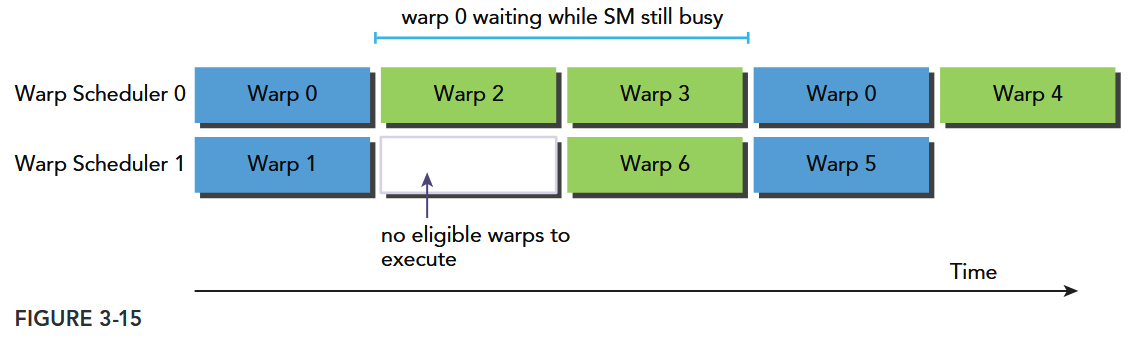
If a warp stalls, the warp scheduler picks up an eligible warp to execute in its place. Because compute resources are partitioned among warps and kept onchip during the entire lifetime of the warp, switching warp contexts is very fast.
Compute resource partitioning requires special attention in CUDA programming: The compute resources limit the number of active warps. Therefore, you must be aware of the restrictions imposed by the hardware, and the resources used by your kernel. In order to maximize GPU utilization, you need to maximize the number of active warps.
Warp 雕塑
当某个活动 warp 陷入“停滞”(Stalled)时,warp 调度器会立刻从“合格 warp”(Eligible)中选一个替换执行,避免硬件空闲。由于每个 warp 的计算资源(寄存器等)在其“生命周期”内始终在芯片(On-Chip)上分配且不释放,因此 warp 上下文切换几乎无额外开销,速度极快
Latency Hiding
An SM relies on thread-level parallelism to maximize utilization of its functional units. Utilization is therefore directly linked to the number of resident warps. The number of clock cycles between an instruction being issued and being completed is defined as instruction latency. Full compute resource utilization is achieved when all warp schedulers have an eligible warp at every clock cycle. This ensures that the latency of each instruction can be hidden by issuing other instructions in other resident warps.
Compared with C programming on the CPU, latency hiding is particularly important in CUDA programming. CPU cores are designed to minimize latency for one or two threads at a time, whereas GPUs are designed to handle a large number of concurrent and lightweight threads in order to maximize throughput. GPU instruction latency is hidden by computation from other warps.
- SM 的核心逻辑:靠“驻留线程束(Warps)”提升硬件利用率
- SM(GPU 的核心计算单元)的目标是让自身的功能单元(如计算单元、存储单元)最大化被利用,而实现方式是线程级并行(Thread-Level Parallelism)——即同时管理多个“线程束(Warp)”(注:Warp 是 GPU 的基本调度单位,通常包含 32 个并行线程)。
- 硬件利用率直接取决于驻留线程束数量:驻留的 Warp 越多,SM 可调度的并行任务就越多。
- 如何通过“隐藏延迟”实现资源满负荷利用
- 先明确概念:指令延迟(Instruction Latency) 指一条指令从“发出”到“执行完成”的时钟周期数(比如访问内存的指令,延迟通常较高)。
- 满负荷利用的条件:SM 中的每个“线程束调度器”,在每个时钟周期都有可调度的 Warp。
- 核心机制——延迟隐藏:当某个 Warp 的指令因延迟(如等内存数据)暂时无法推进时,调度器会立刻切换到其他“可执行的 Warp”并发出其指令。这样一来,前一个 Warp 的指令延迟就被其他 Warp 的计算“掩盖”了,硬件不会因等待而空闲。
When considering instruction latency, instructions can be classified into two basic types:
- Arithmetic instructions: Arithmetic instruction latency is the time between an arithmetic operation starting and its output being produced. (10-20 cycles for arithmetic operations)
- Memory instructions: Memory instruction latency is the time between a load or store operation being issued and the data arriving at its destination. (10-20 cycles for arithmetic operations)
Figure 3-15 illustrates a simple case for an execution pipeline in which warp 0 stalls. The warp scheduler picks up other warps to execute and then executes warp 0 when it is eligible again.
You may wonder how to estimate the number of active warps required to hide latency. Little’s Law can provide a reasonable approximation. Originally a theorem in queue theory, it can also be applied to GPUs .
Figure 3-16 illustrates Little’s Law visually. Suppose the average latency for an instruction in your kernel is 5 cycles. To keep a throughput of 6 warps executed per cycle, you will need at least 30 warps in-flight.
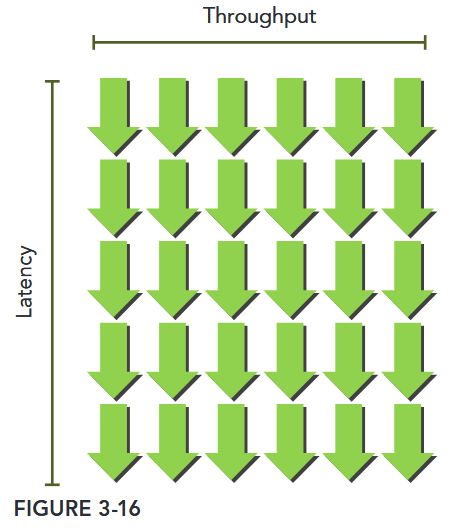
Throughput is specified in number of operations per cycle per SM, and one warp executing one instruction corresponds to 32 operations. Therefore, the required number of warps per SM to maintain full compute resource utilization can be calculated for Fermi GPUs as 640 ÷ 32 = 20 warps. Hence, the required parallelism for arithmetic operations can be expressed as either the number of operations or the number of warps. This simple unit conversion demonstrates that there are two ways to increase parallelism:
- Instruction-level parallelism (ILP): More independent instructions within a thread
- Thread-level parallelism (TLP): More concurrently eligible threads
For memory operations, the required parallelism is expressed as the number of bytes per cycle required to hide memory latency.
Because memory throughput is usually expressed as gigabytes per second, you need to first convert the throughput into gigabytes per cycle using the corresponding memory frequency. You can check your device’s memory frequency with the following command: nvidia-smi -a -q -d CLOCK | grep -A 3 "Max Clocks" | grep "Memory"
An example Fermi memory frequency (measured on a Tesla C2070) is 1.566 GHz. An example Kepler memory frequency (measured on a Tesla K20) is 1.6 GHz. Because 1 Hz is defined as one cycle per second, you then can convert the bandwidth from gigabytes per second to gigabytes per cycle as follows: 144 GB/Sec ÷ 1.566 GHz ≅ 92 Bytes/Cycle. Multiplying bytes per cycle by memory latency (800 cycles for kepler), you derive the required parallelism for Fermi memory operations at nearly 74 KB of memory I/O in-flight to achieve full utilization. This value is for the entire device, not per SM, because memory bandwidth is given for the entire device.
Connecting these values to warp or thread counts depends on the application. Suppose each thread moves one float of data (4 bytes) from global memory to the SM for computation, you would require 18,500 threads or 579 warps to hide all memory latency on Fermi GPUs: 74 KB ÷ 4 bytes/thread ≅ 18,500 threads.
The Fermi architecture has 16 SMs. Therefore, you require 579 warps ÷ 16 SMs = 36 warps per SM to hide all memory latency. If each thread performed more than one independent 4-byte load, fewer threads would be required to hide the memory latency. Much like instruction latency, you can increase the available parallelism by either creating more independent memory operations within each thread/warp, or creating more concurrently active threads/warps.
Latency hiding depends on the number of active warps per SM, which is implicitly determined by the execution configuration and resource constraints (registers and shared memory usage in a kernel). Choosing an optimal execution configuration is a matter of striking a balance between latency hiding and resource utilization.
Tip
Because the GPU partitions compute resources among threads, switching between concurrent warps has very little overhead (on the order of one or two cycles) as the required state is already available on-chip. If there are sufficient concurrently active threads, you can keep the GPU busy in every pipeline stage on every cycle. In this situation, the latency of one warp is hidden by the execution of other warps. Therefore, exposing sufficient parallelism to SMs is beneficial to performance.
Occupancy
Instructions are executed sequentially within each CUDA core. When one warp stalls, the SM switches to executing other eligible warps. Ideally, you want to have enough warps to keep the cores of the device occupied. Occupancy is the ratio of active warps to maximum number of warps, per SM.
You can check the maximum warps per SM for your device using the following function: cudaError_t cudaGetDeviceProperties(struct cudaDeviceProp *prop, int device);. The CUDA Toolkit includes a spreadsheet, called the CUDA Occupancy Calculator, which assists you in selecting grid and block dimensions to maximize occupancy for a kernel.
After you have specified the compute capability, the data in the physical limits section is automatically filled in. Next, you need to enter the following kernel resource information:
- Threads per block (execution configuration)
- Registers per thread (resource usage)
- Shared memory per block (resource usage)
The registers per thread and shared memory per block resource usage can be obtained from nvcc with the following compiler flag: --ptxas-options=-v
The number of registers used by a kernel can have a significant impact on the number of resident warps. Register usage can be manually controlled using the following nvcc flag –maxrregcount=NUM.
- Small thread blocks: Too few threads per block leads to hardware limits on the number of warps per SM to be reached before all resources are fully utilized.
当每个线程块包含的线程数太少时:
- 单个 SM 能容纳的warp 总数会提前达到硬件上限(比如 SM 最多支持 64 个 warp),但此时 SM 的其他硬件资源(如寄存器、共享内存)还没被用完。
- 后果:SM 的计算单元无法被充分利用——因为 warp 数量不足,当部分 warp 因等待数据(如内存延迟)暂停时,没有足够多的备用 warp 可切换,导致 SM 出现“空闲时间”,算力浪费。
- Large thread blocks: Too many threads per block leads to fewer per-SM hardware resources available to each thread.
当每个线程块包含的线程数太多时:
- 单个线程块会占用更多 SM 资源(如每个线程需分配寄存器,线程块越大,总寄存器占用越多)。
- 后果:SM 能同时容纳的线程块总数减少,且分配给每个线程的硬件资源(如寄存器、共享内存)被压缩——可能导致线程因资源不足被迫“分时复用”,或需要频繁访问速度更慢的全局内存(替代共享内存),反而降低计算效率。
Although each case will hit different hardware limits, both cause compute resources to be underutilized and hinder the creation of sufficient parallelism to hide instruction and memory latency. Occupancy focuses exclusively on the number of concurrent threads or warps per SM. However, full occupancy is not the only goal for performance optimization. Once a certain level of occupancy is achieved for a kernel, further increases may not lead to performance improvement. There are also many other factors you need to examine for performance tuning.
Block 大小设置会影响效率。Occupancy 是一个重要但非唯一的指标。
Scalability
Threads within a thread block can share data through shared memory and registers. When sharing data between threads you need to be careful to avoid race conditions. Race conditions, or hazards, are unordered accesses by multiple threads to the same memory location. There is no thread synchronization among different blocks. The only safe way to synchronize across blocks is to use the global synchronization point at the end of every kernel execution; that is, terminate the current kernel and start a new kernel for the work to be performed after global synchronization. By not allowing threads in different blocks to synchronize with each other, GPUs can execute blocks in any order. This enables CUDA programs to be scalable across massively parallel GPUs.
注:随着架构的演进、又出现了许多新的同步方式。
Scalability implies that providing additional hardware resources to a parallel application yields speedup relative to the amount of added resources. Scalability implies that performance can be improved with added compute cores. Parallel code has the potential to be scalable, but real scalability depends on algorithm design and hardware features.
The ability to execute the same application code on a varying number of compute cores is referred to as transparent scalability. Scalability can be more important than efficiency. A scalable but inefficient system can handle larger workloads by simply adding hardware cores. An efficient but un-scalable system may quickly reach an upper limit on achievable performance.
Figure 3-18 illustrates an example of the CUDA architecture’s scalability. On the left side, you have a GPU with two SMs that executes two blocks at the same time; on the right side, you have a GPU with four SMs that executes four blocks at the same time. Without any code changes, an application can run on different GPU configurations and the required execution time will scale according to the available resources.
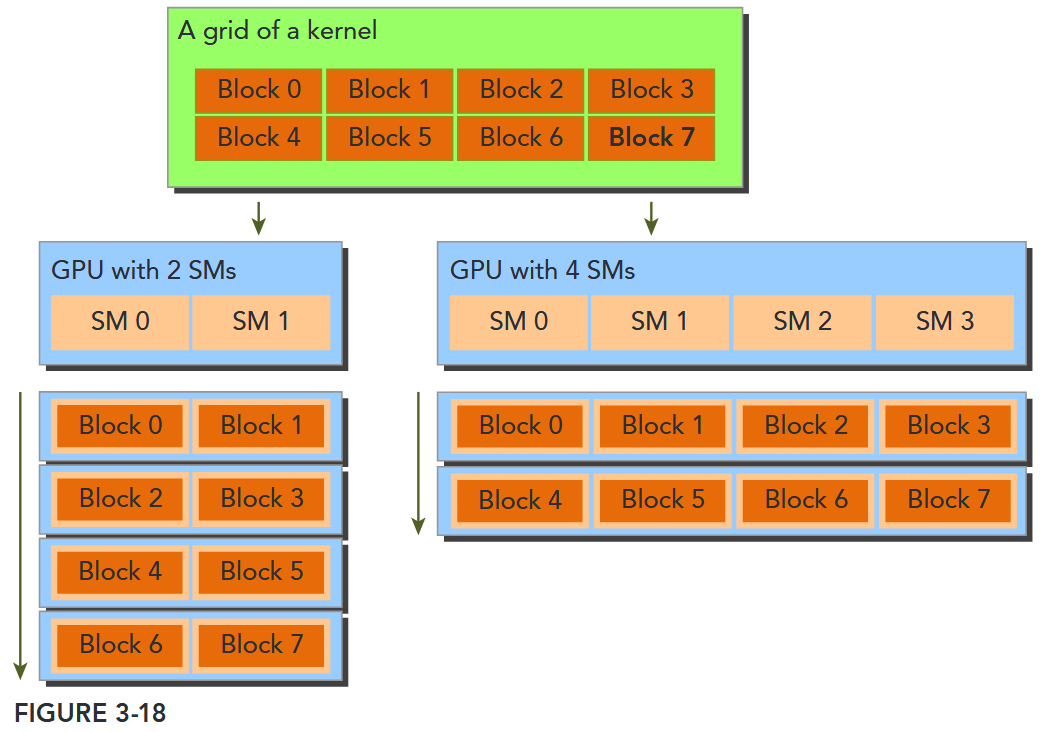
CUDA 具有高效的透明的可扩展性,使得程序可以通过增加硬件核心数获得性能提升。
Exposing Parallelism TODO
AVOIDING BRANCH DIVERGENCE
Sometimes, control flow depends on thread indices. Conditional execution within a warp may cause warp divergence that can lead to poor kernel performance. By rearranging data access patterns, you can reduce or avoid warp divergence. In this section, you will study basic techniques in avoiding branch divergence using a parallel reduction example.
The Parallel Reduction Problem
Suppose you want to calculate the sum of an array of integers with N elements.
int sum = 0;
for (int i = 0; i < N; i++) {
	sum += array[i];
}
Due to the associative and commutative properties of addition, the elements of this array can be summed in any order. So you can perform parallel addition in the following way:
- Partition the input vector into smaller chunks.
- Have a thread calculate the partial sum for each chunk.
- Add the partial results from each chunk into a final sum.
A common way to accomplish parallel addition is using an iterative pairwise implementation: A chunk contains only a pair of elements, and a thread sums those two elements to produce one partial result. These partial results are then stored in-place in the original input vector. These new values are used as the input to be summed in the next iteration. Because the number of input values halves on every iteration, a final sum has been calculated when the length of the output vector reaches one.
Depending on where output elements are stored in-place for each iteration, pairwise parallel sum implementations can be further classified into the following two types:
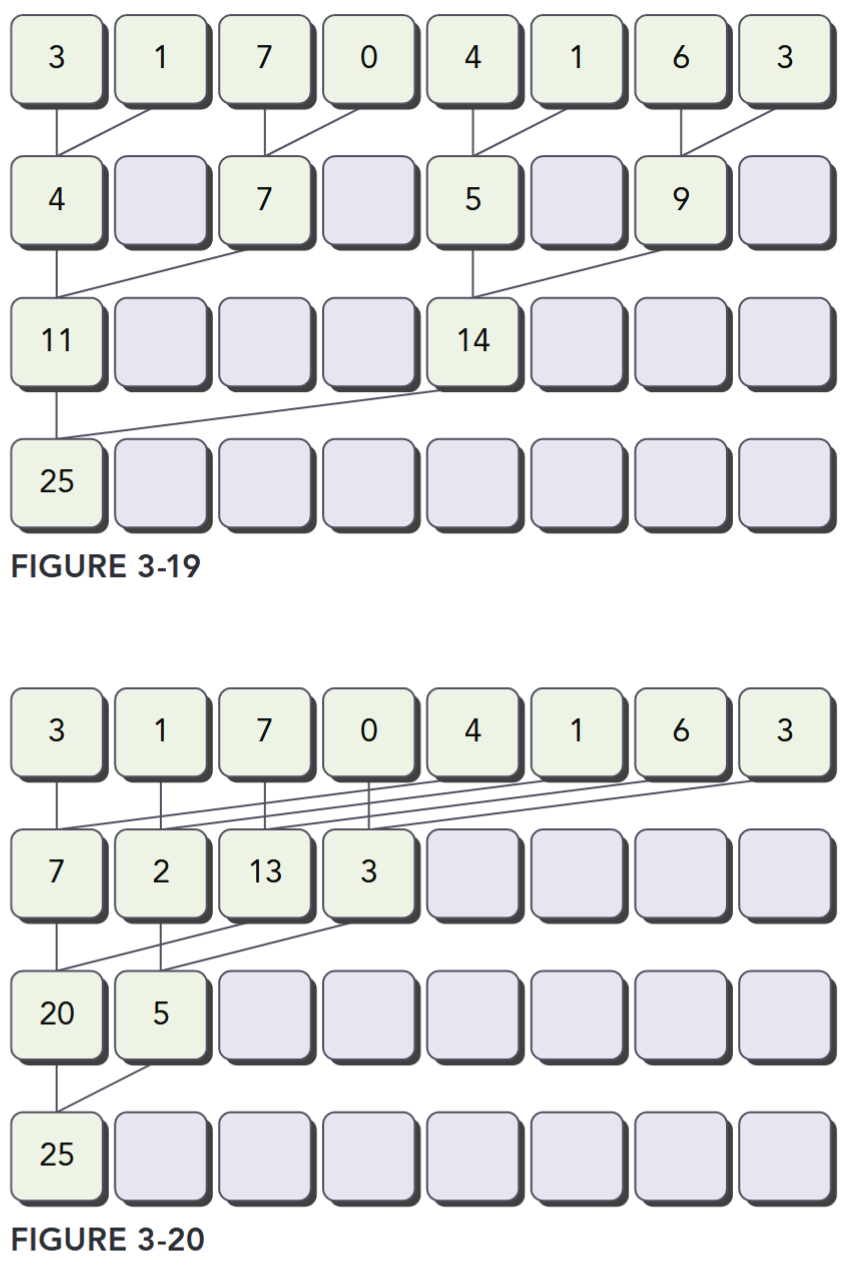
- Neighbored pair: Elements are paired with their immediate neighbor. Figure 3-19 illustrates the neighbored pair implementation. In this implementation, a thread takes two adjacent elements to produce one partial sum at each step. For an array with elements, this implementation requires sums and steps.
- Interleaved pair: Paired elements are separated by a given stride. Figure 3-20 illustrates the interleaved pair implementation. Note that in this implementation the inputs to a thread are strided by half the length of the input on each step.
This general problem of performing a commutative and associative operation across a vector is known as the reduction problem. Parallel reduction is the parallel execution of this operation. Parallel reduction is one of the most common parallel patterns, and a key operation in many parallel algorithms.
Divergence in Parallel Reduction
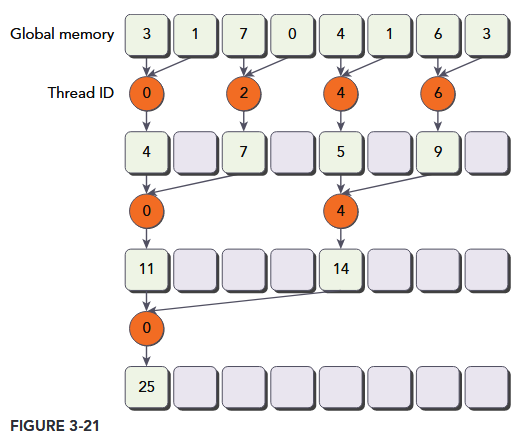
As a starting point, you will experiment with a kernel implementing the neighbored pair approach illustrated in Figure 3-21. Each thread adds two adjacent elements to produce a partial sum.
In this kernel, there are two global memory arrays: one large array for storing the entire array to reduce, and one smaller array for holding the partial sums of each thread block. Each thread block operates independently on a portion of the array. One iteration of a loop performs a single reduction step. The reduction is done in-place, which means that the values in global memory are replaced by partial sums at each step. The __syncthreads statement ensures that all partial sums for every thread in the current iteration have been saved to global memory before any threads in the same thread block enter the next iteration. All threads that enter the next iteration consume the values produced in the previous step. After the final round, the sum for the entire thread block is saved into global memory.
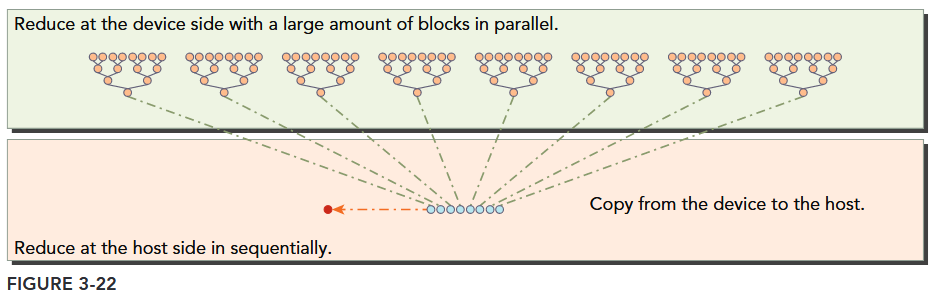
The distance between two neighbor elements, stride, is initialized to 1 at first. After each reduction round, this distance is multiplied by 2. After the first round, the even elements of idata will be replaced by partial sums. After the second round, every fourth element of idata will be replaced with further partial sums. Because there is no synchronization between thread blocks, the partial sum produced by each thread block is copied back to the host and summed sequentially there, as illustrated in Figure 3-22.
代码见
basics/reduce/reduceInteger.cu
Improving Divergence in Parallel Reduction TODO
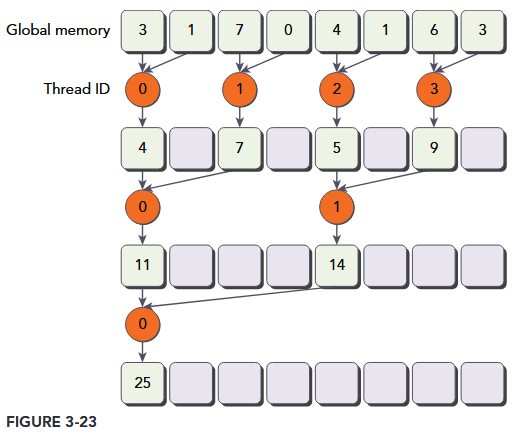
Examine the kernel reduceNeighbored and note the following conditional statement: if ((tid % (2 * stride)) == 0).
Because this statement is only true for even numbered threads, it causes highly divergent warps. In the first iteration of parallel reduction, only even threads execute the body of this conditional statement but all threads must be scheduled. On the second iteration, only one fourth of all threads are active but still all threads must be scheduled. Warp divergence can be reduced by rearranging the array index of each thread to force neighboring threads to perform the addition. Figure 3-23 illustrates this implementation. Comparing with Figure 3-21, the store location of partial sums has not changed, but the working threads have been updated.
Compute Capability
设备的 Compute Capability 由版本号表示,有时也称其“ SM 版本”。该版本号标识 GPU 硬件支持的特性,并由应用程序在运行时使用,以确定当前 GPU 上可用的硬件特性和指令。
Compute Capability 包括一个主要版本号 X 和一个次要版本号 Y,用 X.Y 表示
主版本号表示设备的核心 GPU 架构。主版本号相同的设备共享相同的基础架构。下表列出了与每种 NVIDIA GPU 架构对应的主版本号。
Table 2 GPU Architecture and Major Revision Numbers
| Major Revision Number | NVIDIA GPU Architecture |
|---|---|
| 9 | NVIDIA Hopper GPU Architecture |
| 8 | NVIDIA Ampere GPU Architecture |
| 7 | NVIDIA Volta GPU Architecture |
| 6 | NVIDIA Pascal GPU Architecture |
| 5 | NVIDIA Maxwell GPU Architecture |
| 3 | NVIDIA Kepler GPU Architecture |
2 为 Fermi 架构,1 为 Tesla 架构的设备。
次要修订号对应于对核心架构的增量改进,可能包括新特性。
Table 3 Incremental Updates in GPU Architectures
| Compute Capability | NVIDIA GPU Architecture | Based On |
|---|---|---|
| 7.5 | NVIDIA Turing GPU Architecture | NVIDIA Volta GPU Architecture |
Turing 是计算能力 7.5 的设备架构,是基于 Volta 架构的增量更新。
- https://developer.nvidia.com/cuda-gpus
CUDA-Enabled GPUs 列出了所有支持 CUDA 的设备及其
Compute Capability。Compute Capabilities 给出了每个计算能力的技术规格。
注意:特定 GPU 的 Compute Capability 版本不应与 CUDA 版本 (如 CUDA 7.5、CUDA 8、CUDA 9) 混淆,CUDA 版本指的是 CUDA 软件平台的版本。CUDA 平台被应用开发人员用来创建那些可以运行在许多代 GPU 架构上的应用程序,包括未来尚未发明的 GPU 架构。尽管 CUDA 平台的新版本通常会通过支持新 GPU 架构的 Compute Capability 版本来增加对于该架构的本地支持,但 CUDA 平台的新版本通常也会包含软件功能,而这些是与硬件独立的
从 CUDA 7.0 和 CUDA 9.0 开始,不再支持 Tesla 和 Fermi 架构。
Summary
5. Programming Model
This chapter introduces core CUDA programming model concepts as exposed in C++. Full code for examples (e.g., vector addition) is available in the vectorAdd CUDA sample, with detailed CUDA C++ descriptions in the Programming Interface.
5.1. Kernels
CUDA extends C++ with “kernels”—functions defined with __global__—that run in parallel across N CUDA threads (instead of once like regular functions). The number of threads executing a kernel is specified via the <<<…>>> syntax during launch.
5.2. Thread Hierarchy
Threads are organized into 1D/2D/3D “thread blocks” (max 1024 threads per block, limited by GPU core memory). Blocks are grouped into 1D/2D/3D “grids” to handle large data (total threads = threads per block × blocks per grid).
- Threads in a block share low-latency “shared memory” and sync via
__syncthreads()(or the Cooperative Groups API). - Blocks execute independently, enabling scaling across GPU cores.
For Compute Capability 9.0+, “Thread Block Clusters” (groups of blocks) add a higher hierarchy. Clusters run on a single GPU Processing Cluster (GPC), with shared access to distributed shared memory, configurable at compile or runtime.
5.3. Memory Hierarchy
Threads access multiple memory spaces:
- Private local memory (per thread).
- Shared memory (per block, visible to all block threads).
- Distributed shared memory (for threads in a cluster, with cross-block access).
- Global, constant, and texture memory (global, with global/persistent across kernel launches; constant/texture are read-only and optimized for specific uses).
5.4. Heterogeneous Programming
CUDA assumes a host (e.g., CPU) and a separate device (e.g., GPU) with distinct host/device memory. Programs manage device memory (allocation, data transfer) via the CUDA runtime.
“Unified Memory” simplifies this by creating a single coherent memory space accessible to all CPUs/GPUs, reducing explicit data management. Serial code runs on the host; parallel kernels run on the device.
基础概念:CUDA 模型总结
CUDA(Compute Unified Device Architecture)的基础架构是支撑 GPU 并行计算的底层硬件与软件抽象的结合,其设计核心是通过硬件层面的并行计算单元和软件层面的编程模型,实现高效的通用计算。以下从硬件模型和编程模型两方面详细说明:
- CUDA 编程模型:
- Host(CPU):负责控制流、内存管理
- Device(GPU):负责并行计算
- Kernel:GPU 上执行的并行函数(用
__global__修饰)
- 线程层次:
- Thread:最小执行单元,通过
threadIdx索引。 - Block:线程组(共享内存,同步屏障),通过
blockIdx索引,共享本地内存(Shared Memory)。 - Grid:多个 Block 组成,通过
gridDim指定维度。
- Thread:最小执行单元,通过
- 内存模型:
- 全局内存(Global Memory):GPU 显存,所有线程可访问(读写慢)
- 共享内存(Shared Memory):Block 内线程共享(读写快)
- 寄存器(Register):线程私有(访问最快)。
一、硬件模型(GPU 硬件架构)
CUDA 的硬件基础是 NVIDIA GPU,其架构经过多代演进(如 Fermi、Kepler、Maxwell、Pascal、Volta、Turing、Ampere、Hopper 等),核心设计围绕 “大规模并行计算” 展开,核心组件包括流式多处理器(SM)、内存层次结构和线程调度机制。
1. 流式多处理器(Streaming Multiprocessor, SM)
SM 是 GPU 的基本计算单元,也是并行计算的核心。一块 GPU 通常包含数十到数百个 SM(数量随 GPU 型号变化,如 A100 有 108 个 SM,H100 有 144 个 SM),每个 SM 可独立执行大量线程,实现并行计算。
每个 SM 的核心组成包括:
- 计算核心:
- CUDA Core:负责浮点运算(如 FP32、FP64)和整数运算,是通用计算的基础单元。
- Tensor Core:专为矩阵运算(如深度学习中的矩阵乘累加)优化,支持 FP16、BF16、INT8 等低精度计算,大幅提升 AI 任务效率。
- RT Core:用于实时光线追踪,支持几何交集计算(主要面向图形渲染,部分通用计算场景也可利用)。
- 控制与调度单元:
- warp 调度器(Warp Scheduler):以 “Warp” 为单位调度线程(Warp 是 32 个线程的集合,GPU 硬件天然支持 32 线程同步执行,是并行调度的基本单位)。
- 指令发射单元:将调度器分配的指令发送到计算核心执行。
- 片上内存与缓存:
- 寄存器(Registers):每个线程私有,速度最快(纳秒级访问),用于存储线程执行时的临时变量(如局部变量)。
- 共享内存(Shared Memory):线程块(Block)内的线程共享,速度接近寄存器(十纳秒级),容量较小(每个 SM 通常为 64KB~128KB),可用于线程块内的数据交换和重用,减少对全局内存的访问。
- L1 缓存:每个 SM 私有,用于缓存全局内存或共享内存的数据(部分架构中 L1 与共享内存可配置容量比例)。
- L2 缓存:所有 SM 共享,用于缓存全局内存、常量内存等数据,容量较大(如 H100 的 L2 缓存达 50MB),缓解全局内存带宽压力。
2. 内存层次结构(GPU Memory Hierarchy)
GPU 的内存设计为 “多级缓存 + 全局内存” 的层次结构,核心目标是平衡访问速度和容量,适配并行计算中 “高吞吐量” 的需求。从快到慢、从私有到全局分为以下层级:
| 内存类型 | 访问范围 | 容量(典型值) | 访问速度 | 用途 |
|---|---|---|---|---|
| 寄存器 | 线程私有 | 每个 SM 数万寄存器 | 纳秒级 | 存储线程局部变量(如循环索引、临时计算结果) |
| 共享内存 | 线程块内共享 | 每个 SM 64KB~128KB | 十纳秒级 | 线程块内数据交换、数据重用(如矩阵分块计算) |
| L1 缓存 | 每个 SM 私有 | 每个 SM 16KB~64KB | 十纳秒级 | 缓存全局内存数据,减少重复访问 |
| L2 缓存 | 所有 SM 共享 | 几 MB 到几十 MB | 百纳秒级 | 全局缓存,协调多 SM 的数据访问 |
| 全局内存(Global Memory) | 整个 GPU 设备共享 | 几 GB 到几十 GB | 微秒级 | 存储设备全局数据(主机与设备间传输的数据) |
| 常量内存(Constant Memory) | 整个 GPU 设备共享 | 64KB | 百纳秒级(缓存后) | 存储只读常量(如神经网络权重),通过常量缓存加速访问 |
| 纹理内存(Texture Memory) | 整个 GPU 设备共享 | 与全局内存共享容量 | 百纳秒级(缓存后) | 优化 2D/3D 数据访问(如图像纹理),支持地址越界处理和滤波 |
3. 线程调度机制
GPU 的并行性通过 “多线程并发” 实现,其调度机制围绕 “Warp” 设计,核心特点是 “单指令多线程(SIMT)”:
- Warp(线程束):32 个线程组成一个 Warp,是 GPU 硬件调度的最小单位。同一 Warp 内的线程执行相同的指令(但可操作不同数据),若线程因分支(如
if-else)执行不同指令,会导致 “分支发散”(Warp 需分阶段执行不同分支,降低效率)。 - 调度过程:当 Kernel 函数启动时,线程块(Block)被分配到 SM 上执行;每个 SM 将 Block 拆分为 Warp,由 warp 调度器按周期选择就绪的 Warp(无数据依赖、资源充足的 Warp),发射指令到计算核心。由于 SM 通常可同时容纳数百个 Warp(如 A100 的每个 SM 支持 64 个 Warp),调度器可通过 “隐藏延迟”(当一个 Warp 等待内存访问时,调度另一个 Warp 执行)保持计算核心的高利用率。
二、编程模型(软件抽象)
CUDA 编程模型通过抽象硬件细节,让开发者无需直接操作 GPU 硬件,即可高效编写并行程序。其核心是 “主机 - 设备分离” 和 “分层线程组织”。
1. 主机(Host)与设备(Device)分离
- 主机(Host):指 CPU 及其内存,负责控制程序流程、数据预处理、启动 GPU 计算任务(Kernel),并接收计算结果。
- 设备(Device):指 GPU 及其内存,负责执行并行计算任务(Kernel 函数),仅能通过主机显式调用。
两者通过 PCIe 总线通信,数据需通过 CUDA API(如 cudaMemcpy)在主机内存与设备内存间传输(统一内存技术可简化这一过程)。
2. Kernel 函数(核函数)
Kernel 是在 GPU 上执行的并行函数,是 CUDA 并行计算的核心载体,由 __global__ 关键字修饰。其特点包括:
- 由主机通过
<<<gridDim, blockDim>>>语法启动(如kernel<<<10, 256>>>(args);),其中gridDim和blockDim分别指定线程网格和线程块的维度。 - 启动后,GPU 会创建大量线程(数量 = gridDim.x * gridDim.y * gridDim.z * blockDim.x * blockDim.y * blockDim.z),每个线程独立执行 Kernel 函数的代码。
3. 线程组织(分层结构)
为了高效管理大规模线程(通常数百万到数亿),CUDA 将线程按 “网格(Grid)→ 线程块(Block)→ 线程(Thread)” 的层次组织:
- 线程(Thread):最基本的执行单元,每个线程有唯一 ID(
threadIdx),执行 Kernel 函数的独立实例。 - 线程块(Block):由多个线程组成(通常 128~1024 个线程,需满足 SM 的资源限制),块内线程可通过共享内存和
__syncthreads()同步。一个 Block 只能在单个 SM 上执行(但一个 SM 可同时运行多个 Block)。 - 线程网格(Grid):由多个 Block 组成,可分布在多个 SM 上执行。Grid 内的 Block 间无直接同步机制(需通过全局内存或主机同步)。
- 索引计算:每个线程通过内置变量确定自身在 Grid 和 Block 中的位置,从而定位处理的数据。
进阶理解:CUDA 编程核心
CUDA 编程核心围绕内存管理、线程同步和流并行三大机制展开,它们是构建高效 GPU 程序的基础。以下从原理到实践详细解析:
- 线程组织策略:
- 合理设计 Block 和 Grid 维度,例如处理二维矩阵时使用二维线程块
dim3 block(16, 16)。
- 合理设计 Block 和 Grid 维度,例如处理二维矩阵时使用二维线程块
- 内存优化:
- 使用 Shared Memory 减少 Global Memory 访问(如矩阵乘法中的分块算法)。
- 合并 Global Memory 访问,利用 GPU 的内存事务机制提高带宽利用率。
- 同步与原子操作:
- 使用
__syncthreads()实现 Block 内线程同步。 - 原子操作(如
atomicAdd())用于处理线程间竞争。
- 使用
一、内存管理(Memory Management)
CUDA 内存管理的核心是协调主机(CPU)与设备(GPU)间的数据流动,并优化不同层级内存的使用。
1. 内存分配与释放
- 设备内存分配
cudaMalloc- 需显式管理内存,类似 C 语言的
malloc/free。
- 需显式管理内存,类似 C 语言的
- 统一内存(Unified Memory)
cudaMallocManaged- 系统自动管理主机与设备间的数据迁移,简化编程(但可能牺牲性能,需谨慎使用)。
2. 数据传输
- 同步传输
cudaMemcpy- 阻塞主机线程,直到传输完成。
- 异步传输
cudaMemcpyAsync- 主机线程并行执行,需配合 CUDA 流(Stream)使用。
3. 内存类型优化
- 共享内存(Shared Memory)
__shared__
速度接近寄存器(约 10 周期延迟),用于线程间数据共享。需注意Bank 冲突:若多个线程访问同一内存 Bank,会导致串行化(例如,同时访问 s_data[0] 和 s_data[32])。
- 常量内存(Constant Memory)
__constant__
适合存储频繁使用的只读数据(如神经网络权重),通过硬件缓存加速。
二、线程同步(Thread Synchronization)
CUDA 通过多种机制实现线程间协作,避免数据竞争和不一致。
1. 块内同步(Block-Level Synchronization)
__syncthreads()- 强制块内所有线程等待,直到全部到达同步点。
- 仅在块内有效,不同块间无法直接同步。
2. 原子操作(Atomic Operations)
- 原子加法
- 确保多线程对同一内存地址的操作互斥执行,避免数据竞争。
- 支持
atomicAdd、atomicMax、atomicCAS(比较并交换)等。
3. 全局同步(Host-Device Synchronization)
- 主机与设备同步
cudaDeviceSynchronize(); // 阻塞主机,直到所有设备任务完成- 慎用,可能导致性能瓶颈(如频繁同步会破坏计算与传输的重叠)。
三、CUDA 流(CUDA Streams)
流是 CUDA 异步执行的核心机制,允许任务在 GPU 上并行执行。
1. 流的基本概念
- 流(Stream):GPU 上的独立任务队列,支持任务按顺序执行,但不同流间的任务可并行。
- 异步特性:主机提交任务后无需等待,可继续执行后续代码。
2. 创建与使用流
cudaStream_t stream1, stream2;
cudaStreamCreate(&stream1);  // 创建流
cudaStreamCreate(&stream2);

// 流1:传输数据 → 执行内核 → 传输结果
cudaMemcpyAsync(d_data1, h_data1, size, cudaMemcpyHostToDevice, stream1);
kernel<<<grid, block, 0, stream1>>>(d_data1, d_result1);
cudaMemcpyAsync(h_result1, d_result1, size, cudaMemcpyDeviceToHost, stream1);

// 流2:与流1并行执行
cudaMemcpyAsync(d_data2, h_data2, size, cudaMemcpyHostToDevice, stream2);
kernel<<<grid, block, 0, stream2>>>(d_data2, d_result2);
cudaMemcpyAsync(h_result2, d_result2, size, cudaMemcpyDeviceToHost, stream2);

cudaStreamSynchronize(stream1);  // 等待流1完成
cudaStreamSynchronize(stream2);  // 等待流2完成

cudaStreamDestroy(stream1);  // 销毁流
cudaStreamDestroy(stream2);
3. 流的核心优势
-
计算与传输重叠 通过
cudaMemcpyAsync和流,可实现:- 主机向 GPU 传输数据 A(流 1)
- 同时 GPU 执行内核处理数据 B(流 2)
- 同时主机接收 GPU 处理完的数据 C(流 3)
-
事件(Event)同步
cudaEvent_t start, stop;
cudaEventCreate(&start);
cudaEventCreate(&stop);

cudaEventRecord(start, stream);  // 记录事件
kernel<<<grid, block, 0, stream>>>(d_data, d_result);
cudaEventRecord(stop, stream);

cudaEventSynchronize(stop);  // 等待事件完成
float milliseconds = 0;
cudaEventElapsedTime(&milliseconds, start, stop);  // 计算耗时
四、实战优化建议
- 内存优化
- 优先使用
float4等向量类型提高内存带宽利用率(如__global__ void kernel(float4* d_input))。 - 对大矩阵操作采用共享内存 tiling(如矩阵乘法分块)。
- 优先使用
- 线程优化
- 块大小设为 32 的倍数(匹配 Warp 大小),避免 Warp 分裂。
- 减少分支发散,确保同一 Warp 内线程执行相同代码路径。
- 流优化
- 使用
cudaMemGetInfo()监控设备内存使用,避免过度分配。 - 通过
cudaDeviceGetAttribute()查询设备属性(如最大线程块大小)。
- 使用
五、常见错误与调试
- 内存错误
- 未初始化指针、内存越界访问 → 使用
cuda-memcheck检测。 - 同步错误(如忘记
__syncthreads())→ 导致数据不一致。
- 未初始化指针、内存越界访问 → 使用
- 性能瓶颈
- 内存带宽不足 → 使用 Nsight Compute 分析内存事务效率。
- 计算利用率低 → 检查 Warp 调度和分支发散情况。